GoalsThe goals of this exercise are to apply and hence reinforce your understanding of:
|
CreditsThis exercise is based on an exercise from Lynn Andrea Stein's Rethinking CS101 project. The adaption here was created by David Mutchler, Salman Azhar, Curt Clifton, Matt Boutell and others at Rose-Hulman Institute of Technology. |
Grading RubricYour grade in this project is based on:
|
Consider: When you see “Consider” in red, where do you go to report your answer to that question?
- Hint: You go to the report for the exercise, located in Angel ~ Lessons ~ Project Reports.
- Go to Angel now and report your answer to this (and ONLY this) question.
Consider: When you see “Consider” in red, do you:
- Go to the Angel report to answer that question right at that time, or do you
- Wait until you have done the rest of the exercise?
Consider: When you see “Consider” in red, at that point do you answer:
- Only the single question in that “Consider”, or
- All the questions in the Angel report?
Consider: After you answer a “Consider”-in-red question, the answer to the question is displayed. Do you:
- Read that answer and make sure that you understand it (asking your instructor for help if you don't), or
- Ignore the answer that appears?
Here is a summary specification of BallWorlds:
The project constructs and displays Worlds that contain various kinds of Balls that behave in various ways. For example: The user can construct instances of the various kinds of Balls, drag them around and kill them.
- One kind of Ball (Bouncer) might move in the world and bounce off the World's boundaries,
- another (Shrinker) might grow and shrink in size,
- and yet another (Dud) might do very little at all.
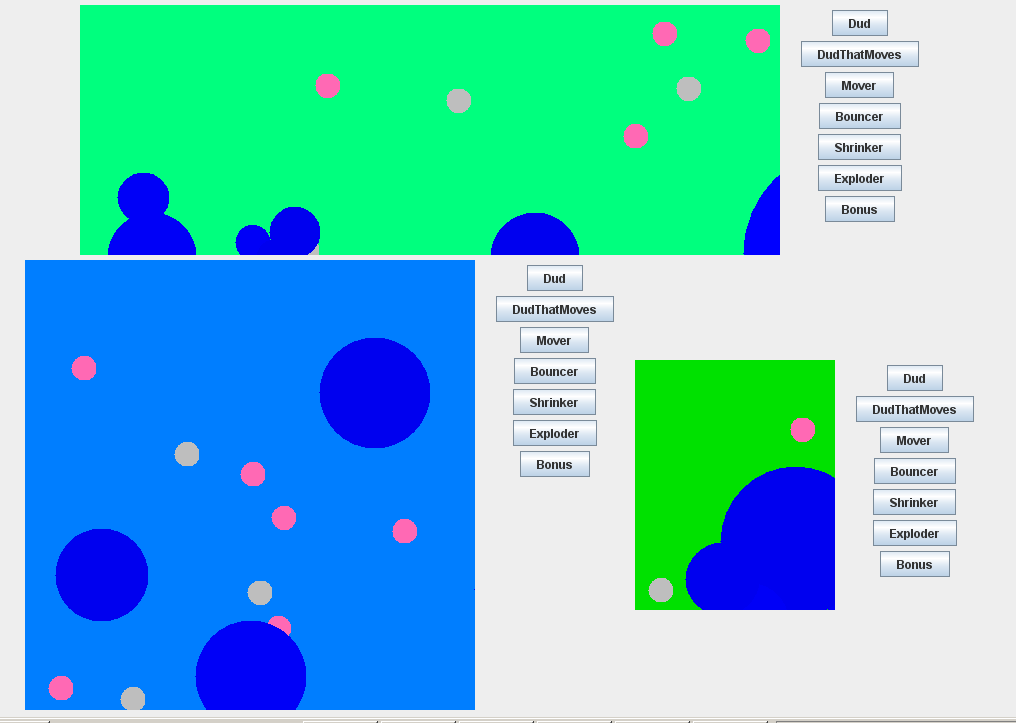
Your instructor will demo an implementation of BallWorlds. Here is a screen shot of BallWorlds that shows what the finished project should look like.
We have provided a framework in which to work. Your job is to implement the various kinds of Balls, with their different behaviours, per the instructions below.
UML (Unified Modeling Language) class diagrams are used primarily for two purposes:
We are using UML for the second purpose in this BallWorlds project.
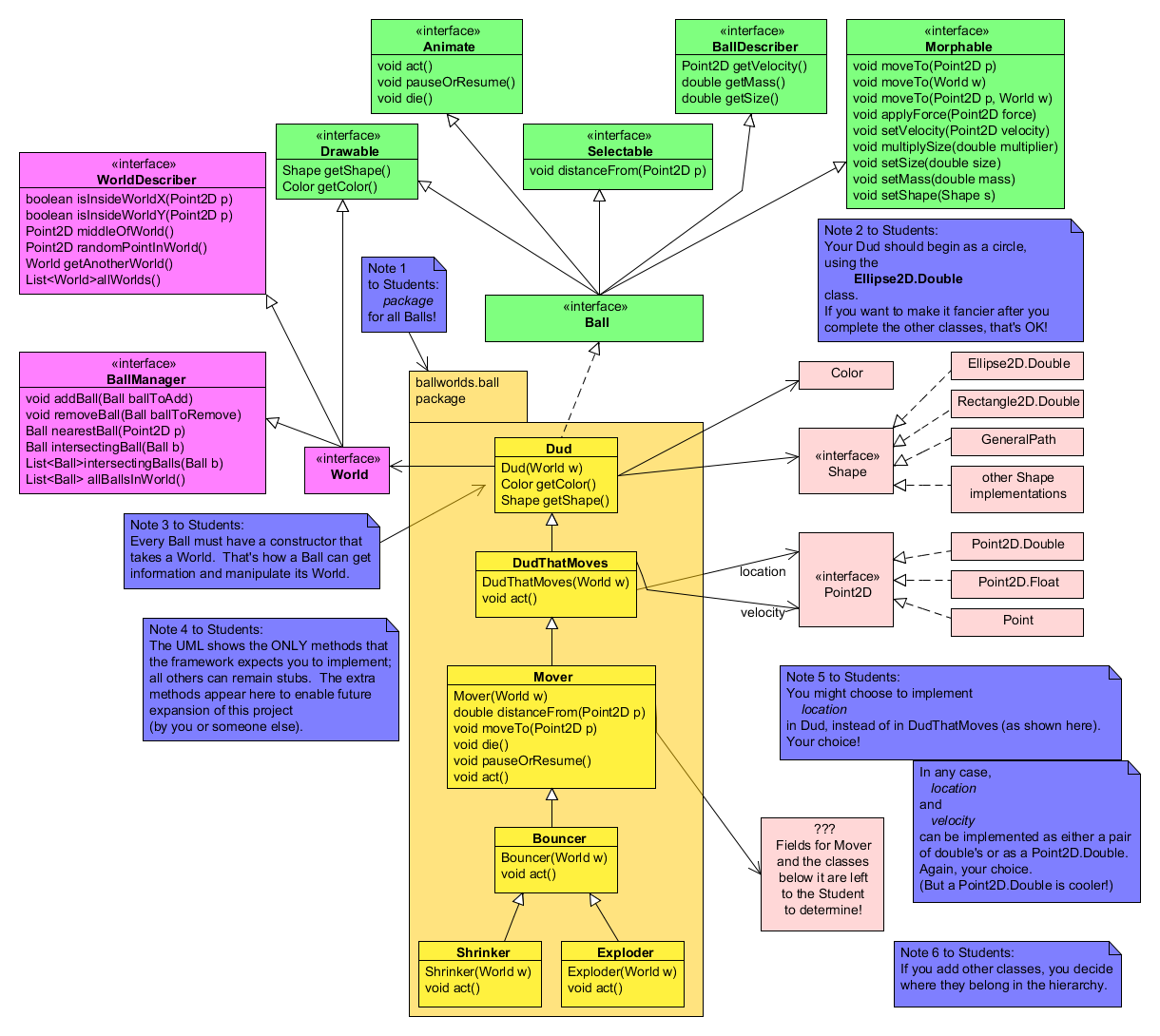
Examine the UML class diagram for BallWorlds. Focus on the Ball class on the right-hand-side of the diagram, since the subclasses of Ball are the portion of the BallWorlds project that you will implement. (We will supply an implementation of the rest of the project.)
Refer to BallWorld's UML class diagram to answer the following questions:
There are six classes that are Balls: Dud, DudThatMoves, Mover, Bouncer, Shrinker and Exploder. These are the classes that you will eventually implement.
These six Ball classes extend the Ball interface, which in turn extends five interfaces: Drawable, Animate, Selectable, BallDescriber and Morphable.
Consider: True or false: Each of your Ball classes must implement all five of the interfaces that Ball extends (possibly by inheriting the implementation from a superclass).
Consider: According to the Drawable documentation, what should a Ball be able to do?
Consider: According to the Animate documentation, what should a Ball be able to do?
Consider: According to the Selectable documentation, what should a Ball be able to do?
Consider: According to the World documentation, what method would be useful to a Ball for the Ball to appear at a random location in its World?
Consider: How does a Ball acquire its World?
Consider: A Dud has what attributes in addition to its World?
Consider: According to that note in the lower-right-corner, all your subclasses of Ball should be in what package?
Important: You must take full advantage of inheritance in this project to get full credit!
You will implement BallWorlds in stages, one Ball class per stage. This is called iterative enhancement.
A Dud is a Ball that merely appears on the screen. It should appear in a random location (otherwise, they will all appear on top of each other), with any reasonable size and color.
Read the instructions in this box before continuing.
For each stage:
- First, READ the description of the Ball class to be implemented in that stage.
- Second, ANSWER the questions in the instructions for that stage.
- Third, ADD a class for that stage with DOCUMENTED STUBS.
- Important: Use Quick Fix to add the stubs for you! Do NOT type the method headers yourself!
- Important: After using Quick Fix to add the stubs, generate the Javadoc html documentatation, noting that the stubs are already documented (from the documentation of the interfaces that your class implements). Add Javadoc comments only where that generated documentation is inaccurate or incomplete.
- Fourth, IMPLEMENT and TEST the Ball class to be implemented in that stage.
For example, first read the description below of a Dud, then answer the questions about the Dud class, then generate the stubs and document as necessary, and finally implement and test your Dud class.
Consider: According to the UML class diagram for BallWorlds, how many methods must any Ball (including a Dud) have?
Consider: Given that a Dud basically does nothing, what method(s) must you convert from stubs to working code? (The rest of the methods can remain as stubs.)
Consider: According to BallWorld's UML class diagram, what fields should a Dud have?
Commit your work to the repository after completing this stage.
You need to use inheritance here. A DudThatMoves is very similar to a Dud, and you should exploit that similarity by inheriting functionality from the Dud.
The framework calls act() on each Ball every 20th of a second or so. So, a DudThatMove's act() method is the place to change the DudThatMove's position.
Consider: According to BallWorld's UML class diagram, what field(s) should a DudThatMoves have (in addition to its inherited fields).
Consider: What method(s) must DudThatMoves override?
Commit your work to the repository after completing this stage.
Last reminder that for each stage you read the specification, answer the questions, add a class with documented stubs, and only then implement and test your class. Don't forget to commit your work to the repository every time you complete a stage.
Additionally, the Mover should be "selectable", "draggable", and "killable" by the mouse.
Remember, each new Ball type needs to be a different new color.
Referring to BallWorld's UML class diagram as necessary:
Consider: What class implements both MouseListener and MouseMotionListener (and hence responds to mouse events)?
Consider: The World responds to a mouse-press by selecting the Ball nearest the mouse (and showing this by turning that Ball red while the mouse is pressed). Which Ball method(s) must be implemented in order for this Ball-selecting to work correctly?
- Note: you will probably want to implement that method back in the Dud class, so that Dud's and DudThatMove's won't always be selected.
- Hint: you don't have to remember the distance formula; a Point2D already knows it!
Consider: The World responds to a mouse-drag by (repeatedly, throughout the drag) telling the selected Ball to move to the current mouse-point. Which Ball method(s) must be implemented in order for this Ball-dragging to work correctly?
Consider: The World responds to a mouse-left-click (i.e. press and release) by telling the selected Ball to toggle between the paused and not-paused state. (So, if the Ball is acting, it should stop acting; while if it is not acting, it should resume acting.) Which Ball method(s) must be implemented in order for this Ball-pause-resume to work correctly?
Consider: The World responds to a mouse-right-press by telling the selected Ball to kill itself, that is, to have itself removed from its World. Which Ball method(s) must be implemented in order for this Ball-suicide to work correctly?
In summary, you don't need to deal with the mouse directly. The framework does that for you. For example, pauseOrResume() is called on the nearest Ball whenever the user clicks the mouse. By implementing pauseOrResume(), you are saying what should change when a Ball is paused.
A Shrinker should neither move nor shrink/grow when in the paused state.
It shouldn't grow or explode when in the paused state.
Consider: According to BallWorld's UML class diagram, Exploder should extend Bouncer. Why is that preferable to extending Shrinker?
Bonus points will vary from just a couple points for something that basically just copies something else that a Ball can do (like just using random colors), to up to 50% bonus for something really original, cool-looking, and non-trivial! Possibilities (of varying difficulty) include:
You can do the Bonus Ball(s) independently (not pair programming), if you wish. The partner whose name is alphabetically first should do a Bonus1 class while the other partner does a Bonus2 class.