Vision Document

Graduation Planning System

Team 5, Section 1 (Lehman, Weinstock, Ulman, Toffolo)


Revision History

Date

Version

Description

Edited by

October 6, 2003

1.0

Initial Draft

Lauren Toffolo, PMP

October 21, 2003

2.0

Updates to Use Case, Use Case Model diagram and feature effort and risk.

Lauren Toffolo, PMP

October 24, 2003

2.1

Updates per team and instructor review.

Lauren Toffolo, PMP

October 28, 2003

3.0

Updates per client review and new requirements from client meeting.

Lauren Toffolo, PMP


1 Introduction

The project team will use this document during development of the Graduation Planning System (GPS).  It is a high level abstraction of the needs and features of the application defining the problem and solution.


1.1  Purpose of the Vision Document

This document collects, analyzes and defines high-level user needs and product features.  Students and advisors at Rose-Hulman do not have an automatic way to generate scheduling into the future in order to generate “what if” scenarios related to graduation.  The student or advisor must manually write out a schedule, reviewing the course catalog for required courses, class offerings, electives and pre-requisites.  They desire the ability to generate a full schedule that allows various changes to scheduling and class load and to be able to know the ramifications on their graduation plans.


1.2  Product Overview

The Graduation Planning System (GPS) will allow students to generate automatic long term scheduling to determine if they are on schedule for graduation and to generate “what if” scenarios if second majors are added, quarters are skipped, classes are dropped or course overload is scheduled.  All scenarios may be saved and reloaded and the ability to check the legality of schedule will insure that the schedule is still valid.  (Prerequisites have been taken etc.)


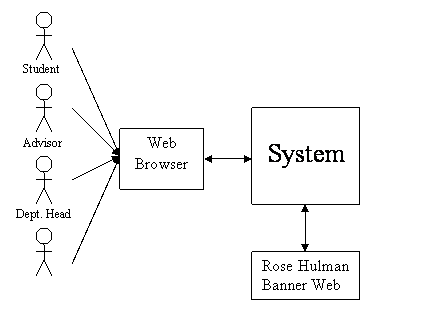
GPS will be integrated with Rose-Hulman Banner Web, and will pull student and course information from it through an interface using database calls to the Banner Web database.


An administrator, possibly in the registrar, will be assigned to maintain the application and will be responsible for loading student information from Banner Web (via a button in GPS), entering department head information and basic maintenance.


Department Heads will generally be responsible for major and minors in their area, entering course information, setting up student advisors, and creating and maintaining degree programs.


Advisors will be able to access the system and generate schedules for students that they advise. 


1.3  References

Communication Documenthttp://www.rose-hulman.edu/class/csse/csse371/Teams/section1/team5/Other Docs

Problem Statementhttp://www.rose-hulman.edut/class/csse/csse371/Teams/section1/team5/Problem Statement

Detailed Use Cases - http://www.rose-hulman.edu/class/csse/csse371/Teams/section1/team5/Use Case Model

Vision Documenthttp://www.rose-hulman.edu/class/csse/csse371/Teams/section1/team5/Vision Document


2 User Description

Main application users will be undergraduate Rose-Hulman Students and Rose-Hulman Advisors.  Additional users will be Rose-Hulman faculty Department Heads and a system administrator.


2.1 User/Market Demographics

The application will not be available externally as a turnkey solution.  It is Rose-Hulman’s position that this application will be developed and supported in house.  The application will be specific to use at Rose-Hulman and no effort will be made to make the application general enough for external use.


2.2 User Profiles

Rose-Hulman Student

This application user is a sophisticated user with varied but strong computer backgrounds.  They are familiar with web browsers and feel comfortable in a computing environment.  The student will use the application to generate a schedule for their use or their advisor’s use.  This will allow the student to review graduation plans if another major is added or dropped, if they decide to sit out a quarter, or overload courses.  It will also allow them to view and substitute classes that are optional such as electives or courses that fall into a selection of X number of courses from a list.


Students frequently find it problematic to determine if they are on schedule to graduate given the number of advance placement credits they may have acquired in combination with their major and minor declarations.  The current use is to manually look up the information in the Course Catalog book and hand write out possible schedules to determine how many hours must be taken each quarter and if the student is on schedule to graduate.  The student must also visit the Course Catalog to determine if he/she has taken the required prerequisites and determine if other courses may be substituted.


Determining a graduation schedule is very difficult due to the various forms of class selections at Rose-Hulman.  Students can have a major and no minor, a major and a minor, a double major etc.  The combinations are endless.  Additionally, many majors and minors have domain tracks or requirements such as “3 of these 5 and 2 of these 3”.  It is very difficult to track manually and determine all the options available.


Schedule generation success to a student means the most flexibility and speed possible.  The student will want to be able to access prerequisites online, switch courses, view which courses of a set (3 of 5) are offered in which quarter and see available substitutes.  Additionally the student should be able to check for a legal schedule, indicating that a prerequisite has not been taken or other degree fulfilling requirements have not been met, or approval is needed from the course instructor, advisor or department head.


Rose-Hulman Advisor

The advisor will have the same capabilities as the student, except the advisor must select a student before generating the schedule.  The advisor will be a Rose-Hulman professor, with at least one year of teaching experience at Rose-Hulman and most likely will hold a PhD.  The advisor will be familiar with web browsers and feel comfortable in a computing environment.


The advisor has similar issues as the student user, with the added issue of freshman schedules.  Freshmen are assigned advisors that may or may not be in their area of study.  It is sometimes difficult for these advisors to help the student plan beyond the next quarter, and depending on the possibly declared major, the next quarter may be difficult as well.  This is because, while most freshman schedules are the same, a few majors require freshmen to take certain courses in their freshman year, that when outside of the advisors area of study, he/she may not be aware of and therefore may miss.


The advisor will generate schedules for students and needs the option of saving and loading student schedules, and checking for legality.  The advisor should be able to select course substitutes, and use the system as if he/she were a student after selecting a student.


Rose-Hulman Department Head

The department head will be a Rose-Hulman professor who determines student advisors for students who have declared majors in his department.  He/She will also setup degree programs, enter and remove courses and maintain like times that course will be available..  The department head will be familiar with browsers and comfortable in the computing environment.


This function will be key to the function of the application.  All course information that is not pulled from Banner Web must be updated in a timely manner for students to have access to real information.  It is assumed that the department heads assistant will also need access to the department head account and will do the majority of input although the department head is ultimately responsible for the content in the system.


In the first release, the department head will be able to enter courses that are definitely offered in a quarter and courses that will most likely be offered in future quarters.  There will be no differentiation between “will be offered” and “most likely will be offered”


Administrator

It is assumed that the administrator of the system will reside in the Registrar’s office and will be knowledgeable of web browsers, data entry, course catalogs, student information and general Rose-Hulman scheduling knowledge.


The administrator will be responsible for maintaining the system through loading of new students and department heads.


2.3 User Environment

The user environment will be a browser-based system connected to the Rose-Hulman network and logged into the application.  The system’s web interface must be compatible with Windows Internet Explorer and should also be compatible with Netscape Navigator. Compatibility with as many major Internet browsers as possible is positive.


The student and advisor users must have an account and access to Banner Web and Kerberos, prior to using the GPS application.


The application will be integrated with Banner Web and will provide response time similar to other applications on the Rose-Hulman network.  If Banner Web or the network is not available the GPS application will not be available either.


Schedule generation will occur within 5 seconds of a system request for generation.  Edits to class offerings, viewing course information, adding, changing and deleting administrative information will be instantaneous.  (Per client constraint)


2.4 Key User Needs


2.5 Alternatives and Competition


Currently no competitive product exists, but several teams are competing inside the CSSE 371 class (sections 1 and 3) to build the appropriate application.


3 Product Overview


3.1 Product Perspective

Administrator


3.2 Product Position Statement

This system is for Rose-Hulman Institute of Technology, who requires an integrated online scheduling tool to deal with the growing complexities of creating a four-year plan of study. The scheduling tool is an online, web-based application, which will contain a database of all courses and degree requirements at Rose-Hulman and will allow students and advisors to access that information and use it to review possible schedules. There is currently no other scheduling aid available and most scheduling is done on a case-to-case basis by meeting with student advisors. Our product will fill this important gap, saving students and faculty time and reducing the chance of scheduling errors. 


3.3 Summary of Capabilities

The basic function of this program will be to aid students in planning the courses that they need to take in order to graduate from Rose-Hulman in the amount of time and with the degrees that they desire. It will also aid Student Advisors as well as Students by providing a single source for course information, providing scheduling suggestions, and by streamlining Student/Advisor interaction.


Customer Benefit

Supporting Features

Students will be able to easily plan their course schedule for their entire time at Rose-Hulman

·      Ability to identify course sequences for all majors including prerequisites.

·      Ability to generate suggested courses and setup a timeline.

·      All schedule editing tools (substitute/add/delete classes, allow quarters to be skipped, preview “what-if “scenarios).

·      Integration with Banner Web (allows system to recognize transfer/AP credits, take into account student’s declared major).

·      System will be able to automatically create a schedule based on the data from Banner.


Students will be able to work out complicated schedules possibly involving double majors, co-ops, overloads, and/or transfer/advance placement credit much more easily than before.

·      System will recommend possible substitutes for any course.

·      Student can customize the parameters of his/her schedule (how much to overload, what quarters to skip, what majors and minors to schedule for, and/or when he/she should graduate by).

·      Department heads can access and make adjustments to student schedules, thus streamlining the process of getting a plan of study approved.


Advisors will be able to easily keep track of the plans of study of their students.

Students and advisors will also be able to communicate more efficiently.

·      Advisors will be given access to all their advisees’ accounts so they can look at their scheduling scenarios.

Department Heads will be able to easily distribute information about new classes and majors.

·      Department head has access to modify course offerings and need of prerequisites.

·      Students can access information about all courses on the system (description, course number, pre-requisites), immediately after Department Head makes changes.


3.4 Assumptions and Dependencies

This system is heavily dependent on being able to interface with Banner Web. It gets the majority of its data about the student users from its database. Also, since Banner Web will still be the official online registration tool, this scheduling tool must be able to interface with Banner Web via database calls.


The program is also dependent on maintenance by Department Heads and System Administrators.  In order for the system to provide accurate scheduling information, it must have the most current information on courses and degree requirements.  Since some courses are available every fall quarter or usually in the fall quarter, the department head will need to verify that all courses that are available for the next quarter are in the system at least two weeks prior to the registration period.  The Administrator must perform basic maintenance functions to insure that student information is loaded at least annually.


3.5 Cost and Pricing

The costs of the system include both upfront development costs as well as continuing costs to keep the system up to date so that it can provide the latest scheduling information.


4. Feature Attributes

All features were ranked and prioritized by the team and client.  Negotiations were made with the client to postpone some features until version 2.0 or 3.0 of the product.  The following attributes were used:


Priority (Cumulative Team vote, client vote with client having higher weight)

Critical – Must be included

Important – Of high priority but the application would be usable without this feature.

Useful – Of medium priority.

Nice – Of Low Priority


Effort (Design, development and testing time)

High – Significant Work, estimated to be more than one week

Medium – Estimated to be at least one week

Low – Estimated to be less than one week


Risk

High – Risk is high to implement feature on time and correctly and within budget

Medium – Risk is significant and may impact delivery date, budget or correctness

Low – No to small risk to product delivery date, budget or correctness


Target Release

1.0              Will be included in the first release

2.0              Postponed until after initial implementation

3.0              Postponed until more detailed requirements can be gathered and a new release schedule determined.


Use Case

Name of the Use Cases used to describe the feature requirements.  Supplemental Spec is used to indicate the requirements are contained in the Supplemental Specifications document.


Notes

Important information regarding the feature.


5. Product Features


Feature No.

Description

Priority

Effort

Risk

Targeted Release

Use Case

Comments

1

Ability to generate suggested courses and setup a timeline.

Critical

Medium

Medium

1.0

Manual Schedule Generation


2

Ability for a department head to add new courses or remove old courses.

Critical

Low

Low

1.0

Add New Course / Edit Degree Program


3

Integration with banner.

Critical

Medium

Medium

1.0

Supplemental Spec Doc


4

Compatible with existing software.

Critical

High

Medium

1.0

Supplemental Spec Doc


5

Compatible with existing hardware.

Critical

Low

Low

1.0

Supplemental Spec Doc


6

Ability to generate different freshman schedules based on possible majors.

Critical

Medium

Medium

1.0

Select Major


7

Ability to recognize fast track credits.

Critical

Medium

Medium

1.0

Supplemental Spec Doc

From Banner

8

Allow quarters to be skipped.

Important

Medium

Low

1.0

Skip Quarter


9

Allow part time, full time and course overload.

Important

Medium

Medium

1.0

Enter Max Credit Hours

From Banner

10

Preview course descriptions and prerequisites.

Important

Medium

Low

1.0

Get course info


11

Department head has access to modify course offerings, need of prerequisites and class size.

Important

High

Low

1.0

Edit Degree Program


12

Tools for advisors (needs defined)

Important

High

High

2.0


Negotiated out based on risk, effort estimates.

13

Tools for registrar (student interest level, alert for scheduling conflicts)

Important

High

High

2.0


Negotiated out based on risk, effort estimates.

14

Ability to have double majors

Important

Medium

Medium

1.0

Select Major


15

Ability to enter advance placement credits

Important

Medium

Medium

1.0

Supplemental Spec Doc

From Banner

16

Ability to enter off campus credits

Important

Medium

Medium

1.0

Supplemental Spec Doc

From Banner

17

Access to grade replacement for failing grades to indicate that a course has been passed.

Important

Medium

Medium

1.0

Supplemental Spec Doc

From Banner

18

Ability to recognize transfer credits.

Important

Medium

Medium

1.0

Supplemental Spec Doc

From Banner

19

Ability to substitute a class.

Important

Low

Low

1.0

Supplemental Spec Doc


20

Ability to recognize major/minor change.

Important

Medium

Medium

1.0

Supplemental Spec Doc

From Banner

21

Ability to recognize dropped or added courses.

Important

Medium

Medium

1.0

Supplemental Spec Doc

From Banner

22

Access to system with knowledge of which courses have been completed successfully.

Important

Medium

Medium

1.0

Supplemental Spec Doc

From Banner

23

Course information and prerequiste information available for viewing.

Important

Low

Low

1.0

View substitutes / Get Course Information / Show Tool Tip

Data assumed to be entered into application.

24

Ability to request over load quarters.

Important


1.0

Enter Max Credit Hours


25

Ability for dept. head to add a new major or minor.

Important

High

Low

1.0

Create new degree program


26

Randomly and automatically choose when more than one option  (This feature will keep all students from being placed in the first section of a course offering.)

Useful

High

High

3.0


From Banner

27

Ability to ‘preview” what if majors and minors

Useful

Medium

Low

1.0

Select Major


28

Graphical representation

Useful

High

Medium

1.0

Switch Schedule View


29

Perspective Rose Students

Useful

High

High

2.0


Negotiated out based on risk, effort estimates.

30

Ability to save a scenario

Useful

Medium

Low

1.0

Save Schedule


31

Ability to identify course sequences for all majors including prerequisites.

Useful

Medium

Medium

1.0

Supplemental Spec Doc

Comes from Banner

32

Ability to allow for co op or sitting out a quarter.

Useful

Medium

Low

1.0

Skip Quarter


33

Ability for dept. head to drop an old major or minor.

Useful

High

Low

1.0

Edit Degree Program


34

Ability to take pre req's at same time as course.

Useful

Medium

Medium

1.0

Add Course


35

Ability to assign another advisor.

Useful

Low

Low

1.0

Add Advisor


36

Ability to be used as a forecasting tool for department heads in order to predict the number of sections required.

Useful

High

High

2.0


Negotiated out based on risk, effort estimates.

37

Auto generated timeline for each student.  (Created behind the scenes to reduce the load on the system by all students logging in at the same time)

Nice

High

High

3.0


38

Reporting by quarter, year, student status, major, professor, class size, class room

Nice

High

High

3.0


39

Handling web based courses.

Nice

High

High

3.0


40

Ability to modify course time of day and instructor choices.

Nice

High

High

3.0


41

Ability to know when class sections are full and indicate to student who may seek permission from instructor to add.

Nice

High

High

3.0


42

Integration with financial aid office.

Nice

High

High

3.0


43

Ability to recognize class capacity.

Nice

High

High

3.0


44

Ability to override class capacity.

Nice

High

High

3.0


45

Ability to add a new building.

Nice

High

High

3.0


46

Ability to add a new instructor.

Nice

High

High

3.0


47

Ability to add new classrooms.

Nice

High

High

3.0


48

Ability to create adhoc reports.

Nice

High

High

3.0


49

Access to system with GPA knowledge (for overloading)

Nice

High

High

3.0


50

Ability to recognize courses that don't count for overloading (ROTC, life skills)

Nice

High

High

3.0


51

Ability to see final scheduling times.

Nice

High

High

3.0


52

Ability to view course name on the schedule grid when the mouse is moved over the course number.

High

Low

Low

1.0

Show Tool-Tip


53

Ability for changes in the schedule to ripple throughout the graduation plan as they are applied as constraints.

High

High

Medium

1.0

Supplemental Spec Doc


54

Visual Queues: show which courses have been taken; area, free, tech, or restricted elective

High

Low

Low

1.0

Supplemental Spec Doc


55

Visual Queues: show which courses are definitely available during the quarter vs usually available.

Low

High

High

2.0


Later Release

56

Allow for "fixing" a quarter so that the ripple change will not affect the specific quarter.

High

Medium

Medium

1.0

Lock Course


57

Use drop down boxes for area, tech and restricted elective.

High

Low

Low

1.0

Select Specific Course for Elective Spot


58

Split Free Elective Selection into a separate screen showing course prefix and course number.

High

Low

Low

1.0

Supplemental Spec Doc


59

Allow generic class prefix and number selection as placeholders for humanities and tech electives.

High

Low

Low

1.0

Supplemental Spec Doc


60

Ability to add constraints to schedule via buttons.

High

Low

Low

1.0

Add Constraint


6. Exemplary Use Cases

The following is a sample sequence of use cases that a student might use when registering his or her classes.  The use case documents contain more detailed descriptions of the use cases below.


6.1 Log On

The User Can log on to the system.


Name of Use Case:

Log On

Brief Description:

This use case describes the steps to log on.

Actors:

Student, Advisor, Department Head, Administrator

Basic Flow:

  1. The user attempts to log on to the system.
  2. The user is prompted for identification.
  3. The user gives their username/password.
  4. The user is logged on to the system.

Alternate Flows:

  • The user fails to provide valid identification, and is not logged on.

Pre-conditions:

The user is not logged onto the system.

Post-conditions:

The user will be logged in but no schedule will be loaded.

Special requirements:

The user must be connected to the network.


6.2 Automatic Schedule-Data Entry

The student user should be able to generate a complete, automatic schedule in one of two ways. The student can just tell the system to use all of his/her existing information (retrieved from Banner Web) and create a schedule based on that and making the assumption that they will be doing nothing out of the ordinary.


The other alternative should be that the user can enter alternate information to modify how the schedule is created. This option would be used if the student wants the schedule to take into account: overload of quarters, skipping quarters to do co-ops, changing degrees, getting a double major or double degree, or graduating by a certain date.


Name of Use Case:

Automatic Schedule-Data Entry

Brief Description:

When a student creates a new schedule, this will be one way to generate the basic information that the system needs to generate a schedule based on information retrieved from Banner.  (Major, courses completed, GPA, number of credits, class section, instructor, class capacity, room number)

Actors:

Student, Advisor, Banner Web.

Basic Flow:

1.      The Person selects “Create Automatic Schedule” from the User Interface (either a button or menu item).

2.      The Person selects “Generate Schedule” and the system creates a schedule based on the information pulled from Banner Web.

3.      Once the schedule is created the student is taken to the schedule editing/viewing screen.

Alternate Flows:

o          If Banner Web is down or unavailable the system will return an error message and a schedule will not be generated.

Pre-conditions:

For this use case to occur, the student must have already completed the Login use case.

Also, student information must be in the Banner Web interface.

Post-conditions:

A schedule will be generated.

The student will be brought to the main schedule editing/viewing screen of the user interface.


6.3 Add Course

When viewing a possible schedule, the user may choose to add a new class, either to take extra courses or to view how said change would affect them.


Name of Use Case:

Add Course

Brief Description:

This use case describes the steps to add a course to the schedule scenario currently being edited.

Actors:

Student Advisor

Basic Flow:

  1. The user clicks the add course button.
  2. The add course screen is displayed.
  3. The user selects a course prefix and number.
  4. The user selects the school year to add the course to.
  5. The user selects the quarter to add the course to.
  6. The user clicks OK the course is added to the schedule, the user is returned to the schedule editing screen and any changes caused by the course are rippled through the schedule.

Alternate Flows:

  • The user attempts to add an invalid course or another error occurs, and the user will receive a prompt.
  • The user cancels instead of adding to the schedule, in which cash they are returned to schedule editing screen without changes.

Pre-conditions:

The user must be logged into the system and have a schedule.

Post-conditions:

The user will still be logged in and a schedule will be loaded with the new class and any changes that are caused by adding the course.


6.4 Show Legality

The system should tell the user when a schedule has been selected that may not work based on various scheduling and course sequencing rules.


Name of Use Case:

Show Legality

Brief Description:

The system will check for scheduling conflicts, required prerequisites, overload vs. GPA requirements, required lab sections, duplicate courses, and courses that have already been taken (this last item will depend on the grade obtained, and when and the number of times the course has been previously taken).

Actors:

Student, Banner Web, Course Information Database

Basic Flow:

1.      The student selects the “Show Legality” button on the user interface.

2.      The Show Legality Screen is displayed with information relating to specific courses that cause a conflict.

3.      A text summary of any conflicts detected will be displayed below the student’s schedule.

4.      The user selects OK and is returned to the Schedule Editing Screen.

Alternate Flows:

If Banner Web or the requested data is not found, an error message will be displayed, and the system will proceed without checking conflicts, which require any information that is unavailable.

Pre-conditions:

The user must be logged in and be viewing a schedule.

Post-conditions:

Returned to the Schedule Editing Screen.

Other stakeholders:

Registrar, Advisors


7. Other Product Requirements


7.1 Applicable Standards

The system has two primary interfaces that require standardization.  The user interface will be implemented with secure web pages.  The system therefore must conform to the server side standards for the HTTP protocol if it is a stand-alone system (i.e., not written in ASP, CGI, etc…).  These standards are documented in RFC 2616 for HTTP 1.1 or RFC 1945 for HTTP 1.0.  Security requires compliance with SSL/TLS documented in RFC 2246 and extensions documented in RFC 2818 (“HTTP Over TLS”), RFC 3268 (“Advanced Encryption Standard (AES) Ciphersuites for Transport Layer Security (TLS)”), and RFC 3280 (“Internet X.509 Public Key Infrastructure Certificate and Certificate Revocation List (CRL) Profile”).  The second interface requires the system to interact with Banner Web.  This also may be done via client side HTTP over SSL/TLS as specified by the documents required for the user interface.  It remains to be researched if there is a more efficient interface to Banner Web.  If it is discovered that there is, then that interface must conform to the standards that Banner Web supports.  As described in section 7.3, the existing Kerberos system may be used for authentication, in which case the standards presented in RFC 1510 and possibly RFC 1964 would also be required.


In addition to interface standards, the system must also enforce legal issues involving which parties have access to certain information about a student.  The legal requirements will most easily be gathered from the client as the client must already implement some of them in the Banner Web system and others in general policies of access to information of which the client is in possession.


7.2 System Requirements

The system will require a network server, meaning that it must be connected to the network, be capable of handling a large amount of network traffic, and be guaranteed to have reasonable uptime for a server.  The requirement specification as it stands defines only the remote user’s interface to the system, which is independent of the platform on which the product is installed.  When a decision is made as to how the system will be implemented, that decision may restrict what platform is required.  The system will require a reasonable amount of memory and processing power to automatically generate schedules, check the legality of schedules, and manage many open sessions simultaneously.  Exactly how much memory and processing power will be required is again deferred until certain implementation decisions may be made.


7.3 Licensing, Security, and Installation

No special licensing or installation requirements are required unless a license is required to interface with any Banner Web components the client is using.  The system will require a method for verifying user passwords.  This may be implemented through Kerberos, as the client uses Kerberos to authenticate users to most on-campus resources.  The system also should use SSL/TLS to secure the connection to the user, which requires a valid SSL certificate purchased from Verisign or a similar certificate authority.  At the option of the client, the system may use a certificate that has not been purchased from a certificate authority if the users are instructed to ignore the resulting warning message displayed by the user’s web browser (this issue is raised only because it appears to be the current security model for the client).


7.4 Performance Requirements

The product must perform the scheduling and legality checking requirements described in the section on system requirements, as well as the capability of maintaining several simultaneous sessions with different users.


8. Documentation Requirements


8.1 User Manual

The user manual will be built from uses cases, the use case model, and the use case map.


8.2 Installation and Configuration

Members of the development team will be made available to help Rose-Hulman install and integrate the product into their own computer systems. Continued support for the software will be made available at an agreed upon price, thus specific configuration and installation documentation beyond the technical documents used in development are not cost effective or necessary.


8.3 Labeling and Packaging

No labeling/Packaging will be required, as the system is web base and integrated into Rose-Hulman’s existing computer systems. A logo, however, should be created to give the system a unique identity.