Cars, Trucks and Trains!
CSSE 221 – Fundamentals of Software Development Honors
Fall 2009–2010

Work on this exercise EITHER by yourself, OR with a partner, using pair programming.

Goals

The goals of this exercise are to apply and hence reinforce your understanding of:

  • The use of UML class diagrams to brainstorm/develop and then communicate designs
  • Developing a Graphical User Interface (GUI) by using Swing components
    • Including using paintComponent and repaint
  • Implementing interfaces , including interfaces for event-driven programming
  • Using polymorphism through an ArrayList of Vehicle objects
  • Implementing by using documented stubs and an iterative enhancement plan
  • (Optionally) pair programming

Grading rubric

You start with 100 points. For each of the features listed below that is missing or implemented incorrectly, you lose 20 points.

  • So if you do nothing, your score is negative!
  • This grading scale is chosen to make sure you do ALL of this very useful project.

Required features:

  • Vehicles are drawn successfully. 20 points for each of: (Car, Truck, Train, Random Vehicle).
  • User-interface items work correctly. 20 points for each of: (truck container length, number of boxcars, position of vehicle, direction of vehicle, and type of vehicle).
  • Appropriate design. 20 points for each of:
    • Uses polymorphism to draw the vehicles (and anywhere else appropriate).
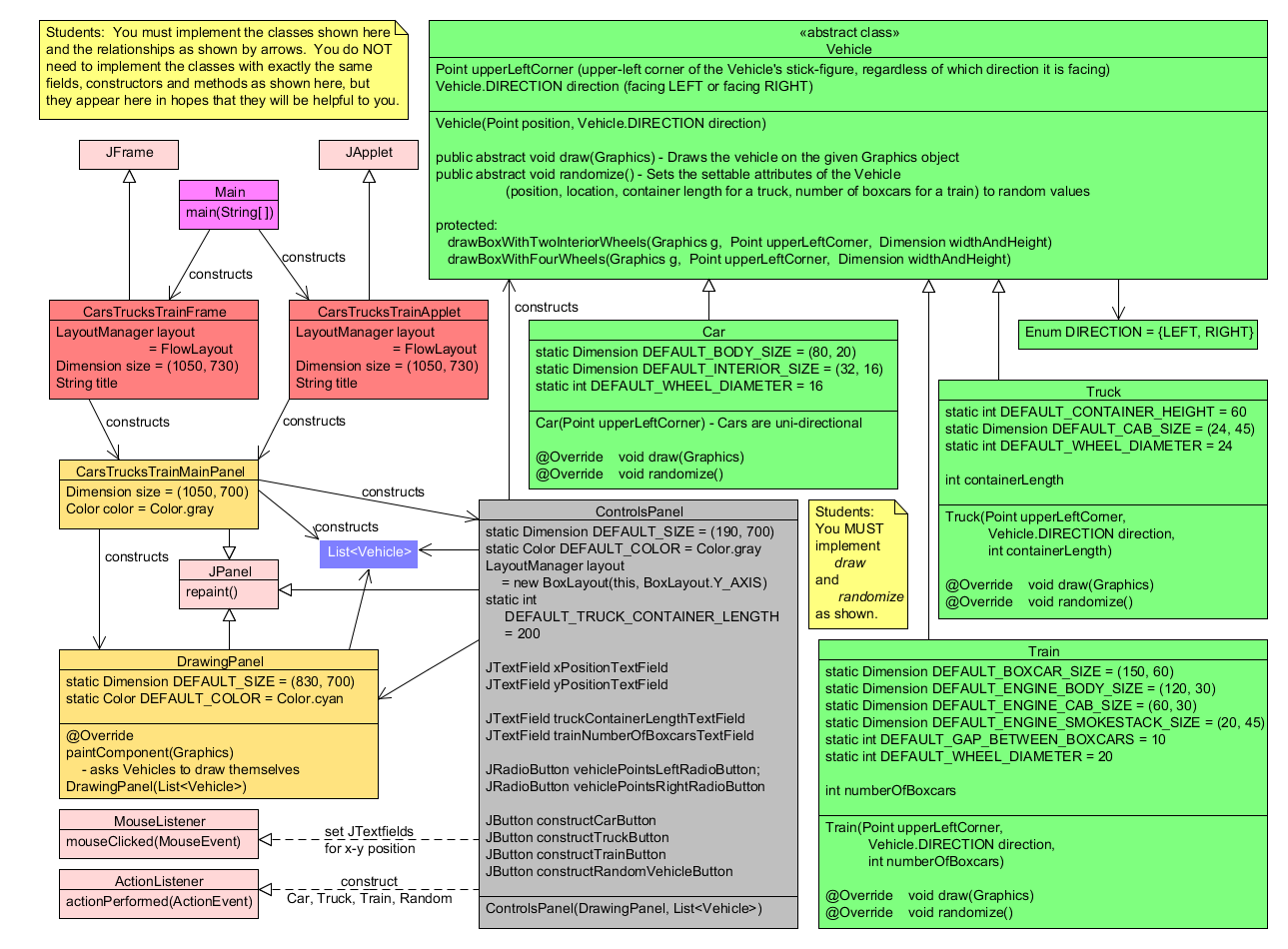
    • Implements the classes listed in the UML class diagram.
    • Implements the interfaces listed in the UML class diagram.
    • Implements the has-a arrows listed in the UML class diagram.
    • Implements the is-a arrows (inheritance) in the UML class diagram.
  • Has appropriate documentation (20 points) and style (20 points).
  • Includes an appropriate iterative enhancement plan (20 points).

Overview and Instructions

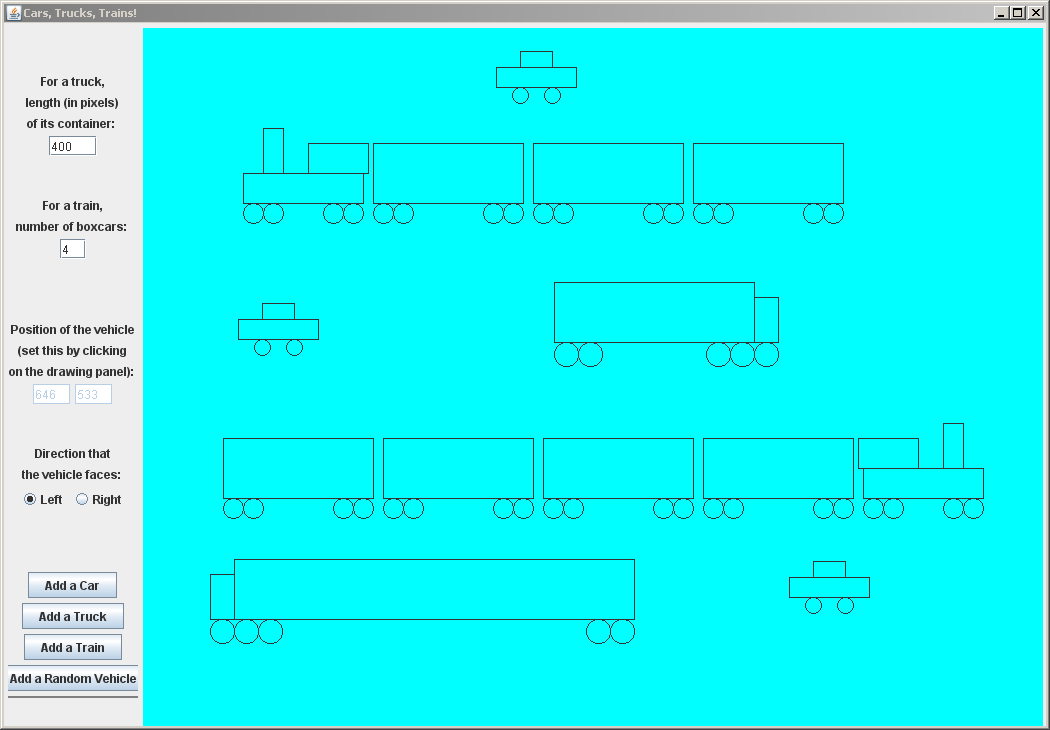
You will design and implement an application that has all the functionality suggested by the picture to the right and described in the Specification below.

  • You will implement by using:
    • (Optionally) pair programming
    • documented stubs
    • an iterative enhancement plan
  • You must obey the UML class diagram that we developed as a class.
    • But see the important Note on that UML class diagram (in yellow), that indicates what it means to “obey the diagram”.

Solved CarsTrucksTrains project
  1. Checkout the CarsTrucksTrains project that we put in your individual repository.

  2. Your instructor will have demonstrated a completed CarsTrucksTrains project. Read the Specification below. Ask questions as needed.

  3. With your instructor, review the UML class diagram that you developed in whole-class discussion.

  4. Write an iterative enhancement plan in the IterativeEnhancementPlan.txt file in your checked-out CarsTrucksTrains project.
  5. Implement your project per your Iterative Enhancement Plan and using documented stubs.

Specification

  1. Basic functionality: Your program must be able to display cars, trucks and trains, as follows:

    1. Vehicles are drawn as stick-figures (no images).
    2. The user can add cars, trucks and trains to the display, by using the user interface demonstrated to you and pictured above.
      • Once added, a vehicle must remain displayed (even if the application is minimized and then maximized, for example).
      • The user interface also allows the user to place a random vehicle with whatever (reasonable, random) parameters are needed for that vehicle.

    3. All cars have the same size, as follows:
      • Body (bottom rectangular box) is 80 by 20.
      • Interior (top rectangular box) is 32 by 16.
      • Car wheels have diameter 16.
      • Choose any reasonable placement of interior on top of body and 2 wheels below body -- exact placement is not important.
    4. For trucks:
      • The cab (front part of the truck) is 24 by 45.
      • The length of the container (rectangle behind the cab) is specified by the user.
      • The height of the container is 60 (no matter how long the container is).
      • Truck wheels have diameter 24.
      • Choose any reasonable placement of 4 wheels below the container and 1 wheel below the cab -- exact placement is not important.
    5. For trains:
      • The engine body is 120 by 30.
      • The engine smokestack (tall rectangle on top of engine body) is 20 by 45.
      • The engine cab (long rectangle on top of engine body) is 60 by 30.
      • Each boxcar is 150 by 60.
      • The gap between boxcars is 10.
      • The number of boxcars is specified by the user.
      • Train wheels have diameter 20.
      • Choose any reasonable placement of smokestack and cab on top of the engine body, and any reasonable placement of 4 wheels below the engine and 4 wheels below each boxcar -- exact placement is not important.

    6. Per the user interface described below, the user specifies:
      • the direction (facing left or right)
      • position (x,y)
      • length of container (for trucks)
      • number of boxcars (for trains)

  2. Additional functionality. You may implement additional features if you wish, but you receive full credit simply for the above; extra functionality will NOT earn any extra points.
  3. User interface: The user interface must be as demonstrated and pictured above. Ask your instructor if you have questions about the user interface.
  4. Platform. Your program must be able to run as either a Java Application or a Java Applet.
  5. Implementation requirements. Your program must:

    1. Make good use of inheritance and polymorphism. In particular:
      • You must have a Vehicle class with subclasses Car, Truck and Train.
      • Your vehicles should be stored in a single list of Vehicle objects (instead of having separate lists for Cars, Trucks and Trains).
      • Each Vehicle subtype should have a draw(Graphics) method that draws that type of Vehicle.
      • Data and functionality common to the Vehicles should be placed in the Vehicle class.
    2. Obey the UML class diagram that we developed as a class.
      • But see the important Note on that UML class diagram (in yellow), that indicates what it means to “obey the diagram”.

    3. Use Swing components.
    4. Have a clearly documented, object-oriented design that could be easily extended to incorporate additional features.
    5. Have code that is clear, is easily extended, and obeys Sun's code conventions.
      • In Eclipse, Source ~ Format (Control-Shift F) enforces these code conventions.
      • Also choose appropriate names for variables, methods and classes.
    6. Be reasonable in its use of space and time
    7. Be implemented by using documented stubs, an iterative enhancement plan and (optionally) pair programming.