Table of Contents |
Overview |
|
|---|---|---|
|
|
For this project you will design and implement a computer game of your own choosing, subject to the constraints that it must:
Regarding networking: a two-player game is fine, and the game can require the players to cooperate or compete (your choice). You may strive for a more-than-two player game if you wish, but that is not required. Be cautious about games that require large amounts of information to be exchanged in real time. Regarding the three categories of feaures: It is very difficult for you to “scope” the project appropriately for a 4-week team project. By listing your features in three categories, you allow yourself to recover from a badly scoped project (either one that turns out to be too easy or one that turns out to be too hard). See the Grading Rubric below for how this affects the grading. |
Two Rules for Teaming / LearningThis is a team assignment. That means that some “divide and conquer” is valuable (indeed, necessary!) and appropriate. It is also a learning experience. To that end:
It is perfectly fine to get help from the in-class or lab assistants. As always, they should provide help, not do the design or write the code for you. |
Team GradingSee Team Grade and Individual Grade for how the team is graded and how individual grades may be more or less than the team's grade. Note here that: Those who don't obey the two rules for an appropriate learning experience (in Team Participation, to the left) will receive a reduced grade. Also:
|
Subversion Repository
Your SVN repository for this assignment is:
Check out the
All work should be placed in this project folder and committed back to your repository.
After you check out your CapstoneProject, examine its Planning folder and note that templates for all of your non-code documents are already in your CapstoneProject, beneath Planning. Recall the advice on using version control in teams. |
Process |
|
|---|---|
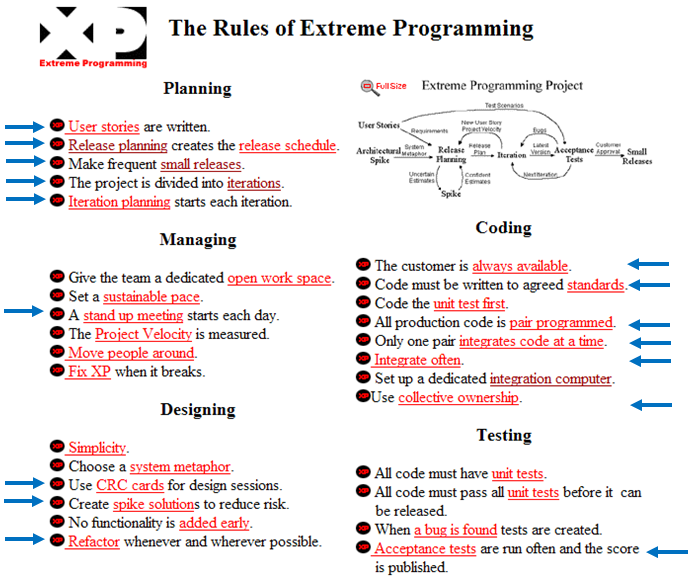
Extreme ProgrammingYou will use many of the Rules and Practices of Extreme Programming. In particular, you will use, in one form or another, all the indicated rules/practices on the image to the right (which is taken from the preceding link). For pair programming, each team member should do at least one pair programming session per cycle. Additionally, you should use documented stubs throughout (i.e., document each method while the method has a stub, THEN write the method's code). In-class timeYou will usually have about 1/3 of each of our sessions to work on your team project.
Team meetings and communicationSchedule regular out-of-class meetings, at least once a week. Recall the advice on conducting Effective Meetings. You will have a Stand-Up Meeting at each class session. Reach agreement on how you will communicate with each other between meetings:
|
|
Milestones and Due Dates |
|||||||||||||||||||||||||
|---|---|---|---|---|---|---|---|---|---|---|---|---|---|---|---|---|---|---|---|---|---|---|---|---|---|
Overall Schedule — Specification and Design, followed by 3 Development Cycles |
|
||||||||||||||||||||||||
Milestones for Cycle 0 |
|
||||||||||||||||||||||||
Milestones for each Development Cycle |
|
||||||||||||||||||||||||
Additional Milestones at the End of the Project |
|
||||||||||||||||||||||||
Descriptions of deliverables |
|||
|---|---|---|---|
| Follow the link to a description of the deliverable: | Elevator statement in your Release Plan | Features, organized into 3 categories (Must-do, Plan-to-do, Will-do-if-time), in your Release Plan | User Stories, organized into 3 cycles (releases), in your Release Plan |
| Screen Layout Sketch | CRC cards | UML Class Diagram | |
| Team Task List for each development cycle | Each individual's Individual Task List for each development cycle | Working Code, committed with comment "Release k" (for k = 1, 2 or 3) | |
| Status Report at the end of each development cycle | Each individual's Evaluation of Team Performance for each cycle | ||
Release PlanThe Release Plan specifies, for each scheduled release of the software, which User Stories will be implemented in that release. Your Release Plan document should contain your:
At the beginning of each cycle, you review your Release Plan and possibly revise which user stories are to be implemented in that cycle.
Find the template for your first Release Plan document in Planning/Cycle1.
|
Elevator StatementYour Release Plan document should contain an Elevator Statement — a description of your project that could be delivered to an interested party in about 30 seconds (e.g. while you are riding in the elevator with them).
Place your Elevator Statement in the Planning/Cycle1/ReleasePlan-ForCycle1.docx file that we provided, at the indicated place in that file. Grading Rubric: Your Elevator Statement must be of the appropriate length (else no credit) and use correct grammar and spelling (else score reduced by up to 50%). Additionally:
|
FeaturesYour Release Plan document should contain a list of the Features of your project.
You should have about 30 plus or minus 10 features, organized into 3 groups — Must-do, Plan-to-do, Will-do-if-time.
Place your Features in the Planning/Cycle1/ReleasePlan-ForCycle1.docx file that we provided, at the indicated place in that file. Grading Rubric: Your Features must be of the appropriate number (else no credit) and use correct grammar and spelling (else score reduced by up to 50%). Additionally:
|
User Stories | ||
| What are User Stories? | Why are User Stories Important? | Grading Rubric for User Stories |
|---|---|---|
|
Your Release Plan document should contain your User Stories. From the Rules of Extreme Programming (XP) at www.extremeprogramming.org/rules/userstories.html: User Stories are written by the customers as things that the system needs to do for them … They are in the format of about three sentences [for us, 1 to 3 sentences] of text written by the customer in the customer’s terminology without techno-syntax … Each story will get a 1, 2 or 3 week [for us, 1, 2 or 3 hours] estimate in “ideal development time” [includes testing, but no meetings, email or other interruptions].
Note that User Stories are descriptions of what the user would be able to DO with the software. For example: User launches program and sees a blank drawing area and some buttons representing actions that could be taken. This story doesn’t say anything about the buttons actually working, so that is not part of this user story. A User Story for a button working might be something like: User clicks the Rectangle button and can then draw a rectangle in the drawing area by clicking and dragging the mouse. If the user can't tell by RUNNING the program whether the User Story was satisfied, then it is NOT a User Story. |
Short development cycles are a key feature of Extreme Programming. This is especially useful for projects where the development team—that’s you—is unfamiliar with the problem to be solved. At the start of each development cycle, the team negotiates with the customer on the work to be accomplished during that cycle, namely, which User Stories are to be implemented in that cycle. After the customer has suggested some user stories for the cycle, the development team will decide whether it is reasonable to complete them all in the time available. If not, the customer will withdraw some of the proposed stories until an achievable set of stories is agreed upon. This just-in-time planning gives XP much of its agility.User stories are powerful in two important ways.
|
For this assignment you’ll play both the customer role and that of the development team.
Place your User Stories in the Planning/Cycle1/ReleasePlan-ForCycle1.docx file that we provided, at the indicated place in that file. Grading Rubric: Your User Stories must be of the appropriate number (else no credit) and use correct grammar and spelling (else score reduced by up to 50%). Additionally:
|
Screen Layout SketchOne way to specify a project is to list its Features or User Stories, as described above. Another way is to provide a Screen Layout Sketch that depicts the user interface for your project. Reach consensus in class on a draft of the Screen Layout Sketch that you will use. Then, one or more team members may finish the sketch outside of class.
Place your Screen Layout Sketch in the Planning/Cycle0 folder, replacing the ScreenLayoutSketch.pdf file that is already there as a stub.
Grading Rubric:
|
CRC CardsYour project must incorporate a good object-oriented (OO) design, as described in your textbook (Chapter 8, sections 1 and 2, and Chapter 12). To come up with this design you will:
CRC Cards are part of Extreme Programming and described at www.extremeprogramming.org/rules/crccards.html. Briefly:
Place your CRC Cards in the Planning/Cycle0 folder, replacing the CRCCards.pdf file that is already there as a stub.
Grading Rubric: Your CRC Cards must be of the appropriate number (else no credit) and make sense given the context of your Screen Layout Sketch, Features and User Stories (else score reduced by up to 50%). Additionally:
|
UML Class DiagramAfter you have completed your CRC Cards, use them to generate a UML Class Diagram, as described at www.agilemodeling.com/artifacts/classDiagram.htm (and at many other places as well). Here is a sanity check for your UML class diagram. Does it:
You must draw your UML Class Diagram using UMLet.
Find and use an empty template for your first UML Class Diagram in Planning/Cycle1.
Grading Rubric: Your UML Class diagram must be readable (but need not be optimal in terms of minimizing line-crossings and so forth); it must use correct correct notation; and it must be up-to-date with your code (else no credit). Additionally, for all of the User Stories in the upcoming cycle:
|
Team Task ListAt the beginning of each development cycle, AFTER you have finalized the User Stories to be implemented in that cycle, make a Team Task List for implementing those user stories. This list should contain all the tasks that you think you have to do to implement the user stories for the cycle. Each task should include:
Be sure to include:
You will have a separate Team Task Plan document for each cycle; find and use the template for your Cycle 1 Team Task Plan in Planning/Cycle1, and similarly for Cycles 2 and 3. It is normal for the task list to change during the cycle — just commit the updated file to your repository whenever it changes. Grading Rubric: Your Team Task List must have enough tasks to implement all of the User Stories in the current cycle (else at most half credit) and it must appear that your team used your Team Task List throughout the cycle (else at most half credit). Additionally:
|
Individual Task ListOne of the hardest skills to develop in software engineering is how to estimate how long it will take to implement a given feature. According to the Personal Software Process (PSP), one of the best ways to being developing this skill is to:
To this end, throughout the three development cycles, maintain an Individual Task List, as follows:
You will have a separate Individual Task List document for each cycle, and each student has their own Individual Task List; find the template for your Cycle 1 Individual Task List with your username in Planning/Cycle1, and similarly for Cycles 2 and 3. Grading Rubric: Your Individual Task List must appear to list all of your work during the cycle (else at most half credit) and it must appear that you updated your Individual Task List throughout the cycle (else at most half credit). Additionally: |
Working CodeAt the end of Cycle 1, commit your Working Code with a comment Release 1; and similarly for Cycles 2 and 3. Your released code should:
You should strive to pass all your acceptance tests for this cycle (as generated from your User Stories), but it is OK if your code does not do so. If there are aspects of your classes that can be tested apart from the GUI, then it would be great if you provide JUnit tests for those features. Grading Rubric:
|
Status ReportAt the END of each development cycle, complete the Status Report for that cycle. It should indicate:
You will have a separate Status Report document for each cycle; find and use the template for your Cycle 1 Status Report in Planning/Cycle1, and similarly for Cycles 2 and 3. Grading Rubric:
|
Evaluation of Team PerformanceFor each cycle (including Cycle 0), I will post a survey on ANGEL called Evaluation of Team Performance. The surveys for the first three cycles will be brief; the survey for the final cycle will be longer. The surveys will help:
Each person does the Evaluation of Team Performance at the end of each cycle; it is NOT a team activity. |
Individual ReflectionYour Individual Reflection is a survey that you do on Angel after completing the rest of the project. It lets you introspect on what went well in the project and how you can do even better on your next project. I expect thoughtful responses to the survey questions in your Individual Reflection. It forms a critical part of both your learning and your grade in the project. Grading Rubric: Your score is:
|
Poster PresentationYou get to show off your project in a Poster Presentation in the Union Lobby during exam week. This will be great fun! Recall the advice on doing a Poster Presentation. Grading Rubric:
|
Grading Rubric |
||||||||||||||||||||||
|---|---|---|---|---|---|---|---|---|---|---|---|---|---|---|---|---|---|---|---|---|---|---|
| How Features Control Scope | Your Team Score | Your Individual Score | ||||||||||||||||||||
|
You will list the Features of your project in your Release Plan. Furthermore, you will organize them into three categories:
I will review and approve them (possibly requiring that some features move from one category to another). Furthermore, if the project turns out to be more difficult than we had anticipated, you should alert me to that fact in your Status Report documents and I may then move features from Must-do to Plan-to-do and/or from Plan-to-do to Will-do-if-time.
|
Your Team Score is:
|
Your Individual Score (that is, your final grade on the project) is your Team Score, but REDUCED if you are NOT:
If you aspire to a higher level of achievement than your teammates do on this project, your team should talk with me early in the project to see how we can structure the project for this. |
||||||||||||||||||||