CSSE 120 -- Intro. to Software Development

Homework 7

  1. Complete the assigned reading for the next session, Zelle sections 5.1- 5.7, 5.9 (skim 5.8 as reference). 
  2. (24 Points) Complete the Angel quiz over this reading. You'll find this on the course Angel page,
    under Lessons → Homework → Homework 7 → Graphics and Objects
  3. (15 points) File Output
    1. Storing information in files is a very important exercise for engineers running experiments that generate a large quantity of useful data.  The stored data can later be analyzed, categorized, and manipulated to allow engineers to draw useful conclusions.  Last time you did this problem, you wrote the data to the screen; this time, you will actually write it to a file.

      Often, the generated data is formatted so that another program can automate the process of analyzing, categorizing, and manipulating the data. In this problem you are to write a program, funcDump.py, that implements the following design:

    2. Prompt the user for a number of data points, num,  to list.
    3. Write that many points to the a file named cos.txt, as described below:
    4. Write num lines to the file. Each line should have the data:

      n      200 + 200cos(nπ/180)

      where n ranges from 0 to num - 1. Make sure the output is neatly formatted so numbers and decimal points line up. Below is a sample of the expected output. Your program's output should match this format exactly.

       98   172.165
      99 168.713
      100 165.270
      101 161.838
      102 158.418
      103 155.010
      104 151.616
      105 148.236
      106 144.873
      107 141.526
      108 138.197
      109 134.886
      110 131.596
      111 128.326
      112 125.079
      113 121.854
      114 118.653
      115 115.476
      116 112.326
      117 109.202
      118 106.106
      119 103.038
      120 100.000
      121 96.992
      122 94.016

Submit your Python source file and the generated output to the funcDump Drop Box in the Homework 5 folder on ANGEL.

  1. (40 pts) RobotPathViaPoints. You will write a module, via.py, that will drive the robot through an environment using moves to via points stored in a file. The program will:

    1. Prompt the user for the port to which they are connected.
    2. Prompt the user for the file name and open the file with that name.
    3. Read each line of the file. Each line will contain 4 values (turnAngleInDeg, turnVelocity, fwdDistanceInCm, fwdVelocity)
    4. For each line, turn the robot based upon the turn angle and speed, then drive the robot forward based upon the forward distance and velocity. For example (this is box.txt): Expected out from viaExample.png
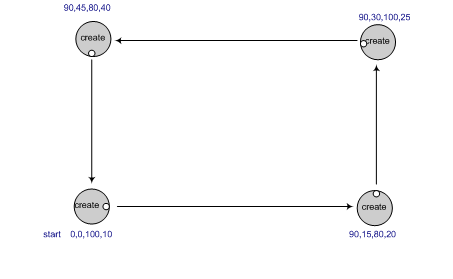
    Hints:
    1. You will likely use the go(), sleep(), and stop() functions to move the robot, as you did last time. This is easiest, since it sends a command, waits the right amount of time (which you'll have to calculate), then sends the next command, etc.
    2. Don't forget to close both the file and the connection to the robot (using robot.shutdown()) at the end of your code!
    3. Another option to sleeping, that some may wish to try, is to use feedback from the encoders to drive a certain distance. (An encoder is a mechanical device attached the robot's wheels to measure how far it has traveled). In this paradigm, your program sends all the commands at once, and the robot does them in the order it receives them. The advantage is that you don't need to calculate how long to sleep, the waitAngle() and waitDistance() methods do that for you. Caution: once you send the robot the shutdown() command, it will stop immediately; the workaround is to insert a long sleep before the shutdown command. See the pycreate documentation for details.
    4. What you notice is that the more the robot moves the less accurate it will become in moving the prescribed distance or returning to the same point. This robot drifting is called odometry error. Odometery error means that the longer the robot travels, the sensor used to calculate the distance traveled (the encoder) begins to accumulate error. This error is based upon wheel slippage, friction, uneven surfaces, wobbling wheels or sensor inaccuracy. In other words, the robot may “think” it is at a different place in the world than it actually is. This is a common problem in robotics research and it is necessary to add hardware or write control algorithms to combat this. For your homework, it is important to recognize the problem but you will not modify your program to compensate for it.
Test your program using simple.txt, negatives.txt, smallBox.txt, box.txt, and asterisk.txt (right-click on the link and choose "save link as..." to download the whole files). Note, you must place these files in the same folder as via.py in order to read them. Submit your Python source file only (not the test files) to the RobotPathViaPoints Drop Box in ANGEL.
  1. More Python culture: What's up with the shrubbery examples? Check out this visit of King Arthur to the Knights Who Say “Ni!”.