Please note: Due to the exam on Tuesday evening (and cancelled class session 9) , all of this assignment is due at the beginning of class session 10, which is a day later than the programming part would normally be due.
(40 pts) Mutable Parameters. This exercise deals with the concepts in section 6.5 of Zelle. You may wish to re-read that section before doing this exercise.
In class we saw that functions can assign to their formal parameters:
def nextSquare(x):
    x = x + 1
    return x * x
But we also saw that the calling code cannot see the effect of this assignment:
y = 8
next = nextSquare(y)
print "y = %d, next = %d" % (y, next)
# prints:
# y = 8, next = 81
This is because the assignment to
x
in
nextSquare()
only changes the value referred to by
x. Informally, it just moves the post-it note for
x
onto the number 9, but the post-it note for
y
remains stuck to 8.
We've also seen that we can modify lists without using assignment:
squares = []
for n in range(10):
    squares.append(n**2)
print squares
# prints:
# [0, 1, 4, 9, 16, 25, 36, 49, 64, 81]
Here the
append()
method tells the
squares
list to add the given square to its "tail". Informally, the
squares
post-it note remains stuck to the same list throughout the code, but the list is being
mutated
by the
append()
method.
We can also mutate a list by assigning to its individual elements:
numbers = [2,3,5,7,11]
for i in range(len(numbers)):
    numbers[i] = numbers[i] ** 2
print numbers
# prints:
# [4, 9, 25, 49, 121]
In this example the
numbers
post-it note never moves once it is stuck to the original list. The assignment to
numbers[i]
in the body of the loop
mutates
the list by changing elements
inside it. It might help to think of the list like an egg carton. We put the numbers 2, 3, 5, 7, and 11 into the first five pockets of the egg carton, then we affix the
numbers
post-it note to the carton. In the loop we take out each number and replace it with its square, one pocket at a time. The carton and the post-it note never change.
We can use this idea of mutating a list to create a function that changes its parameters. Here's a function that does just that:
def factEach(nums):
    """Replaces each element of nums with its factorial."""
    for i in range(len(nums)):
        nums[i] = factorial(nums[i])  # factorial defined as in class
And some code demonstrating the function:
numbers = [2,3,5,7,11]
factEach(numbers)
print numbers
# prints:
# [2, 6, 120, 5040, 39916800]
Open the mutantFunctions.py file in your Session08Robotics project.
Within it, write and test functions that meet each of the following specifications:
			(10 Points)
			squareEach(nums)
, where
nums
is a list of numbers.
Modifies
the list by squaring each entry.
			(10 Points)
			sumList(nums)
, where
nums
is a list of numbers.
Returns
the sum of the numbers in the list.
			(20 Points)
			toNumbers(strList)
, where
strList
is a list of strings, each of which represents a number.
Modifies
each entry in the list by converting it to a number. Here's an example use: numList = [10,20,30] print "sum = ", sumList(numList) squareEach(numList) print "squared: ", numList print "sum = ", sumList(numList) strList = ["17", "1.5", "2.718"] print "As strings: ", strList toNumbers(strList) print "As numbers: ", strList #prints the following output: #sum = 60 #squared: [100, 400, 900] #sum = 1400 #As strings: ['17', '1.5', '2.718'] #As numbers: [17, 1.5, 2.718]
Commit your code to your SVN repository.
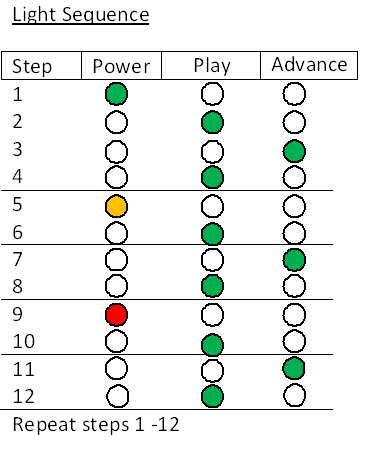
go() method; driveDirect() is much harder to use here.r.setLEDs(0,0,0,0) #turn off all of the robot's LEDS r.setLEDs(0,255,0,0)#turn on only the robot's power LED to green (see documentation) r.setLEDs(0,0,1,0)#turn on only the robot's play LED