ErlangHomework folder. Within the folder are a couple of new files that you will use for this homework.
-
Open the file
creation.erl. -
Experiment with the code. Add a comment describing how the
benchmark/1function works. -
Raise the process limit for Erlang on your machine to 250,000 processes.
-
On a Windows box, you do this by editing the shortcut for Erlang. Edit the properties of the shortcut so that the Target is like:
"C:\Program Files\erl5.6.2\bin\werl.exe" +P 250000Do not change the text between the quotes from what it currently is on your machine. Add the
+P 250000after the closing quote. -
On a *nix box, you raise the process limit by invoking the Erlang shell with the
+P <limit>option. For example:$ erl +P 250000
-
-
Verify that you’ve set the process limit correctly by launching an Erlang shell and evaluating the expression:
erlang:system_info(process_limit). -
Implement a function
benchmark/0to generate a table of benchmark information forNvalues of 1000, 2000, 5000, 10,000, 20,000, 50,000, 100,000 and 200,000. The table should show the value ofN, the “wall clock” time used total and per process, and the processor time used total and per process for each case. See the documentation for theiomodule for help on theio:formatfunction.Here’s example output on my machine using just a single core:
             CPU Time             Clock Time
   N    Tot (s)   Per (ms)    Tot (s)    Per (ms)
  1000   0.000      0.000      0.006      0.006
  2000   0.010      0.005      0.010      0.005
  5000   0.020      0.004      0.020      0.004
 10000   0.030      0.003      0.040      0.004
 20000   0.060      0.003      0.078      0.004
 50000   0.160      0.003      0.209      0.004
100000   0.320      0.003      0.430      0.004
200000   0.660      0.003      0.935      0.005
On my machine, the CPU time per process when using two cores is nearly 6 times higher than when using a single core. Why might that be? If you have a multicore CPU, you can use the
+Sn argument toerlorwerlto tell Erlang to use n schedulers. Set this to 1 to run Erlang on a single core. - Run your code on your machine. Copy and paste your output into a comment in your code.
-
Your work for this task should be done in the file
passing.erl. -
Study the code in the function
ring_part_loop/1. You'll be adding several message patterns to thereceiveblock there. -
Modify
ring_part_loop/1so it handles a message{new_next, Pid}by passingPidto the recursive call rather thanNextProcessPidas in the_Unknowncase. -
Write a function
spawn_ring(N)(and any necessary helper functions) that spawns N processes usingring_part_loop/1. It should use appropriate arguments or message sends to those processes to configure them in a ring as shown in the figure below. Yourspawn_ring(N)should return the process ID of one process in the ring.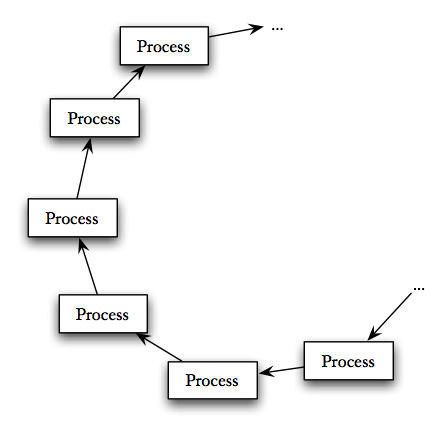
-
Modify
ring_part_loop/1so it handles a message{relay, String, …}, whereStringis some message text and the…is left for you to decide.Design your message structure and code so that the
relaymessage is sent around the ring one full loop. When the message returns to the first process in the ring, that process should print the messageString.During the course of relaying the message you may choose to modify the “
…” part of the message. -
Modify
ring_part_loop/1so the relay message includes a value M like{relay, String, M, …}, whereStringis again some message text,Mis the number of circuits the message should make around the ring, and the…is again left for you to decide.Modify your message structure and code so that the
relaymessage is sent around the ring M full loops. When the message returns to the originating process after the Mth loop, that process should print the messageStringand stop relaying the message. -
Modify your
relaymessage to include an Originator process ID. This originator process ID will belong to some process not in the ring and won't change as the message goes around the loop. Inring_part_loop/1, rather than printing the messageString, change your code to send the message back to the originator, like this:Originator ! String -
Write a function message_test(N, M) that:
- spawns a ring of N processes,
- sends a message around the ring M times,
- dismantles the process ring by asking the processes to exit, and
- returns a four-tuple of N, M, wall clock time, and processor time. The time should only include the message passing time, not the spawning and dismantling time.
- Use your function to calculate the time per message send on your machine for 10,000 processes and 1,000 passes around the loop. Add the answer to a comment in your code.