CSSE 232 - Computer Architecture I
Rose-Hulman Institute of Technology
Computer Science and Software Engineering Department
Exercise 2 -- DECISION INSTRUCTIONS
- Download
p4.asm to your
local hard disk and examine it using your favorite text editor.
- Start PCSPIM and load p4.asm.
- Where are main, loop, exit,
N and Sum located (i.e. what address)? Hint:
Simulator:Display Symbol Table might be useful.
- Before you run the program, calculate the number of
instructions that will be exectued and the final value of
Sum. Note: Appendix A of Patterson and Hennessy has lots
of useful information about MIPS and SPIM.
- Set a break point at main and single step to the end
of the program. How many instructions were actually executed? What
is the final value of Sum?
- Modify p4.asm so that it will work correctly if
N is equal to 0. Be sure to test your modifications to make
sure they work.
- How many instructions does your modified program execute when
N is equal to 5? Can this number be improved? If so, how?
Hint: If you added 5 instructions, you can do better.
- Will your modified program work if N is less than 0?
- Download
p5.asm to your
local hard disk and examine it using your favorite text editor.
- Reinitialize PCSPIM and load p5.asm.
- Run p5.asm. What is the value of max and
maxindex at the end of the program? Are they what you
expect?
- Comment out sll $t5, $t2, 2 and rerun the program.
What happens? Why?
- Modify p5.asm so that the largest element of
A is swapped with the last element of A. Be sure
to adequately test your modified program. Hint: change the elements
and size of A.
- If you repeatedly apply your modified program to the subarrays
of A from 0 to
 where
where  is the number of times
you've applied your program, what is the final state of A?
is the number of times
you've applied your program, what is the final state of A?
- Like p4.asm this program doesn't work if N
is equal to 0. It is brittle in other ways as well. For example,
what happens if all of the elements are less than -1? How could you
address this?
- Download
p6.asm to your
local hard disk and examine it using your favorite text editor.
- p6.asm uses the .asciiz assembler directive.
See page A-47-A-49 and A-14-A-15 of your text for details.
- SPIM also provides a small set system calls to make
input and output easier. We've been using a system call to exit our
programs. p6.asm uses system calls to print integers and
strings. See page A-44 of your text for a complete list of the
available system calls.
- Reinitialize PCSPIM and load p6.asm.
- Run p6.asm. What is displayed in the console window?
- Modify p6.asm to treat V as a circular array
and rotate its contents one position to the right. Rotate the array
in place. Specifically,
 moves to
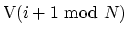 . After performing the rotation, your program
should print the string ``The rotated array:'' followed by the
elements of the rotated array, each preceded by a single space
character.
. After performing the rotation, your program
should print the string ``The rotated array:'' followed by the
elements of the rotated array, each preceded by a single space
character.
J.P. Mellor
2004-09-08