(15 points) Shine like a star: Your work for this problem should be done in the star.py module of the 11-WhileLoops project that you checked out in class.
Create an updated version of the star() function that originally appeared in homework 7. The updated version should take five parameters and draw an inscribed regular star similar to, but more general than the original version. For example, this star function can be called for an even number of points, in which case 2 stars may be drawn. The parameters should be in the following order.
- a GraphWin object where it will do its drawing.
- a Point, representing the center of the circle.
- radius of the circle.
-
number of points of the star—lets call it n
Change for this homework:
Add a Boolean test to see if n is greater than 2 and if n is odd. If n satisfies both these tests, draw the star following the instructions in step e.
If n is not greater than 2, print an appropriate message to the console and do not draw the star.
If n is not odd (i.e., n is even), do the following:
- if n/2 is odd, draw 2 different colored stars each with n/2 points, alternating as described in step e. (See the example in Window 3 below.)
- if n/2 is even, print an appropriate message to the console and do not draw the star.
-
“skip count”, the number of polygon vertices that we skip between consecutive vertices of the star.
For example, in the original star assignment, the skip count was 1 (lines were drawn between every other vertex). A 7-pointed star with skip count 1 would have connected vertices 0, 2, 4, 6, 1, 3, 5, 0. A 7-pointed star with skip count 2 would instead connect 0, 3, 6, 2, 5, 1, 4, 0, as pictured below. Also pictured is a 17-pointed star with skip count 5. A “star” with skip distance 0 is simply a regular polygon.
Here is the main() function that we provided to test your code, followed by the resulting images.
def main():
    '''Tests the required code as given in the homework description.'''
    ''' Tests the star function by calling it multiple times (for multiple tests). '''
    win1 = GraphWin("Odd Points", 600, 200)
    star(win1, Point(100, 50), 35, 7, 2)
    star(win1, Point(300, 80), 70, 17, 4)
    star(win1, Point(500, 100), 100, 2, 1)
    message = Text(Point(300, 190), "Click this window to end program.")
    message.draw(win1)

    win2 = GraphWin("Even Points", 600, 350)
    star(win2, Point(100, 200), 80, 6, 1)
    star(win2, Point(300, 200), 80, 20, 3)
    star(win2, Point(500, 200), 80, 10, 3)

    win1.getMouse()
    win1.close()
    win2.close()
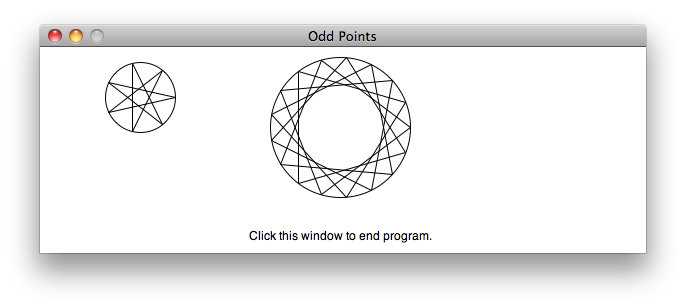
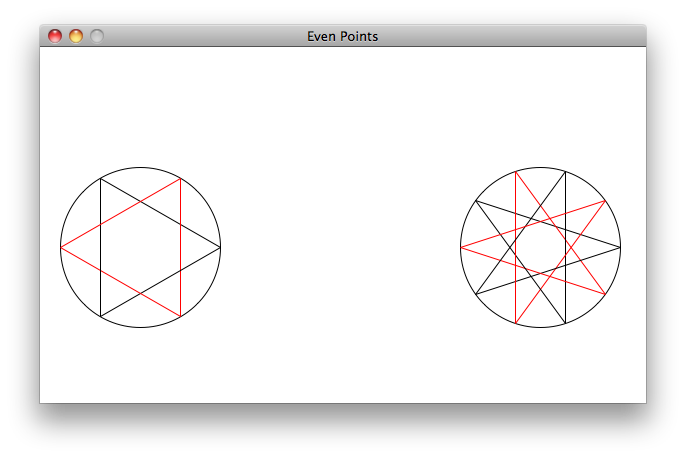
where the following was printed to the console:
Too few points for the star. Need at least 3 points.
Number of points / 2 is still even. Will not draw stars.
(60 points) Speed Reading: Average all of the numbers from an input file (perhaps with multiple numbers on some input lines).
This problem is a bit longer, requiring you to combine the ideas of:
- defining functions,
- reading from files,
- while loops, and
- using a graphics window to get user input.
Your task is to read numbers from a file and calculate the mean of the numbers. Unfortunately, the file is a bit malformed. The numbers are generated by a radar gun that measures the speed of each vehicle on the road coming up the hill from the SRC. Due to an intermittent open circuit occasionally multiple numbers are written on a single line, like this:
23.2 15.6 19.8
A sample input file, speeds.txt, is in your project.
Open the speedReading.py file in the 11-WhileLoops project that you checked out in class. Modify it to calculate the arithmetic mean (average) of the numbers in a file. Your program must conform to the following specifications:
- Your program should use the four functions as given in speedReading.py:
- lineSumAndCount()
- fileMean()
- getInputFile()
- main()
- When you write more complicated programs, you should be able to test them as you go. Typically, software developers write a set of tests for each small part of the program (thus they are called "unit tests"). We've given you unit tests for the first 2 functions in the file speedReadingUnitTests.py to help you. So,
- Write lineSumAndCount() first
- Then run speedReadingUnitTests.py to make sure it works.
- Then write and test fileMean() in the same way.
- Finish up by creating the GUI and testing it on the file
speeds.txtin your project by running speedReading.py. The average of the speeds in that file should be around 20.16.
- Your program should ask the user for the name of the input file to process. Rather than using “console” input, your program should use a GUI similar to the one in Figures 4.9 and 4.10 on pages 106 and 107 of Zelle’s text book. Use an Entry object to accept the input file name from the user.
- Your program should display the final average in the GUI window. Hint: You can use the
setText()method to change the displayed value of a string that has already been drawn. - Yes, there are many other ways that you could write this. We're asking you to follow our specification so you can get practice working with the sort of situations that come up in real world, group projects, where you often must implement someone else's design. We also think that doing it this way will get you to confront some issues and clear up some misunderstandings that you may have about functions.
- Commit your file to your SVN repository.