(20 points) With your pair-programming partner, complete the following two modules that you began in class:
- factorial.py
- barChart.py
These are both in today's Eclipse project 04-ReviewAndPractice.
- You must do these with your pair-programming partner.
-
Obey the pair-programming advice that we discussed in class. It provides:
- Advice for how to be successful in pair-programming.
- What to do if you feel that you cannot do this assignment with your pair-programming partner (e.g., if you missed class and don't have a partner).
- How to ensure that your project is graded and returned to both partners.
(0 points, but required) There's a bug in the combination of Eclipse 3.5, PyDev, Python 3, and Windows. The bug affects the input function, causing the compound expression eval(input("prompt")) to fail. The fix is simple, but you must do it or you'll have trouble on future homework and projects.
- Download this
sitecustomize.pyfile to your computer. Right-click that link and chooseSave Target As, or the equivalent for your browser to save the file. IMPORTANT: Save the file to Downloads or Desktop, not site-packages. -
Drag the file to
C:\Program Files\Python31\Lib\site-packages, as shown in the screenshot below. You need to download to Downloads or Desktop, then drag the file into the folder, otherwise the Windows permissions get messed up. When you drag the file in, Windows 7 will tell you that you need Administrator privileges to do that. Just Accept that dialog.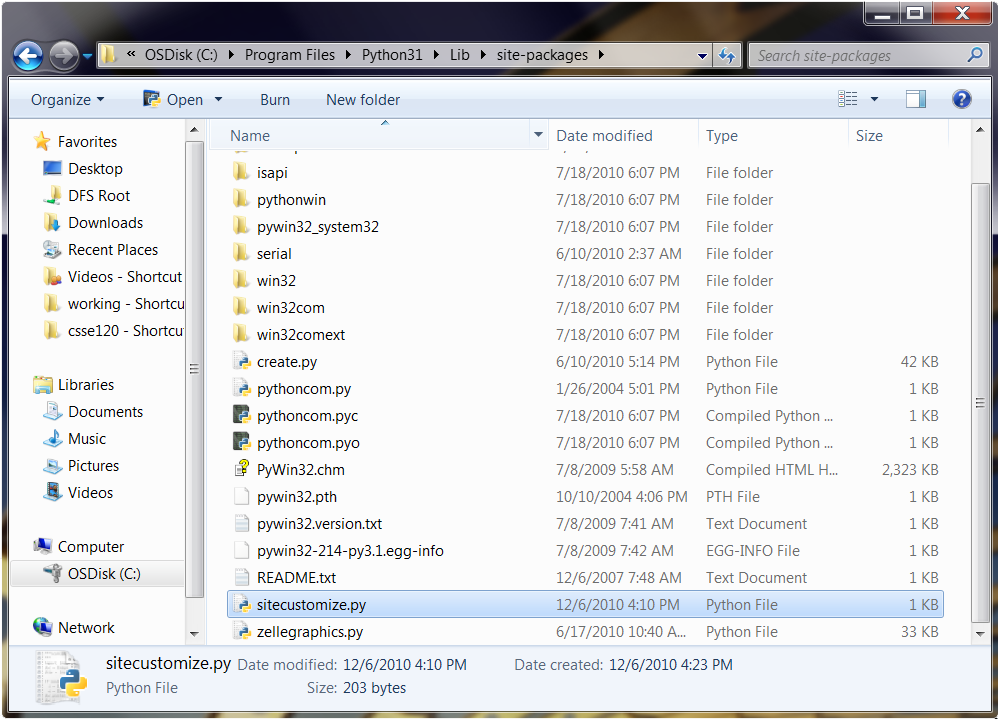
-
Test that this works by creating a new Python module in Eclipse named
check_input.py. Put the following code in that module:x = eval(input("Enter a number: ")) print(x)Run the module and enter any number at the prompt. If the fix worked, the program should just print the number. If the fix did not work, the program will crash with the unhelpful message
SyntaxError: unexpected EOF while parsing. If your program crashed, get help from me or one of the TAs.
(20 points — 10 for each module) Working individually (but getting help if you’re stuck), complete the following two modules that you may have began in class:
- bullseye.py
- sumAndCount.py (this one has two functions for you to implement, in addition to main)
These are both in today's Eclipse project 04-ReviewAndPractice.
- Instructions for each are in the module.
- Simply do the TODO's in the module, in the order listed (1, 2, 3, ...).
- You can navigate to the TODO's easily if you do
Window ~ Show View ~ Tasks
- One of the two functions in sumAndCount.py is countIntegers. Please attempt this function. However:
-
You will find that you need an IF statement. Informally, you want the body of your loop to say:
If the sine of this integer is less than x, make my count go up by 1.
-
In Python, you write that IF statement like this, assuming that k is your loop variable and count is your accumulator variable:
     if math.sin(k) < x:
          Put a statement here that makes count go up by 1.
Give it a try. If you have troubles with it, email
csse120-staff.rose-hulman.eduAlso, don't forget that you need (at the TOP of the module)
import mathfor the sine function, if you write it in its long form as above: math.sin(...). Or you can do
from math import sinif you would rather just write sin(...).
-
Turn in your work by committing it to SVN.