- Complete the short survey on Angel to help me form your project teams:
Lessons → Homework → Homework 14 → Survey to help us form your project team
-
Complete the assigned reading for the next session (Zelle
sections 9.1 - 9.3).
-
(4 pts)
Complete the ANGEL quiz over the reading assignment. You'll find the quiz on the course
Angel page, under
Lessons → Homework → Homework 14 → Simulation and Design
I
-
(65 pts total)
You
must
do this program
using Eclipse
and the
14-NestedLoops project that you checked out in class. Within that project, open the module
NestedLoopsPatterns.py. It contains a template for the rest of this assignment.
-
(2 points)
We will write the function
rectangleOfStars together in class. Make sure you understand how it works. Ask for help if you're confused.
-
(5 points) Based on rectangleOfStars, fill in code for the function
triangleOfStars. This prints out a triangle-shaped grid of stars. For example, the code:
triangleOfStars(6)
should produce the output:
*
**
***
****
*****
******
After testing and debugging this function, commit your work to your Subversion repository. Do this by right-clicking on your
Session12 in Eclipse and choosing
Team → Commit.... Be sure to enter in a sensible log message as the course staff will review the messages.
-
(5 points)
Now make a function called
triangleSameNumEachRow. This function will be like triangleOfStars, except each row shows its number, rather than asterisks. For example, the code:
triangleSameNumEachRow(7)
should produce the output:
1
22
333
4444
55555
666666
7777777
After testing and debugging this function, commit your work to your Subversion repository. Be sure to enter in a sensible log message as the course staff will review the messages.
-
(5 points)
The next function,
triangleAllNumsEachRow, is like triangleSameNumEachRow, except that each character is its position from the left, instead of from the top. For example:
triangleAllNumsEachRow(6)
should produce the output:
1
12
123
1234
12345
123456
After testing and debugging this function, commit your work to your Subversion repository using a sensible log message.
-
(7 points)
The next function,
triangleNumsRightJustified, is like triangleSameNumEachRow (from
problem 6,
not
the previous problem), except that the triangle is right-justified. For example:
triangleNumsRightJustified(8)
should produce the output:
       1
      22
     333
    4444
   55555
  666666
 7777777
88888888
After testing and debugging this function, commit your work to your Subversion repository using a sensible log message.
-
(10 points)
The next function,
triangleNumsCentered, is like
triangleNumsRightJustified, except that the triangle is centered and includes spaces. For example:
triangleNumsCentered(9)
should produce the output:
        1
       2 2
      3 3 3
     4 4 4 4
    5 5 5 5 5
   6 6 6 6 6 6
  7 7 7 7 7 7 7
 8 8 8 8 8 8 8 8
9 9 9 9 9 9 9 9 9
After testing and debugging this function, commit your work to your Subversion repository using a sensible log message.
-
(5 points)
The next function,
numbersConstantForward, takes three arguments: the number of rows, a maximum number to display, and a number of occurrences. The function displays a block of numbers. Each row should be identical and consist of the given number of occurrences of each number from 1 to the maximum number. For example:
numbersConstantForward(4, 7, 3)
should produce the output:
111222333444555666777
111222333444555666777
111222333444555666777
111222333444555666777
After testing and debugging this function, commit your work to your Subversion repository using a sensible log message.
-
(6 points)
The next function,
numbersConstantBackward, is just like numbersConstantForward, except the numbers go from the maximum number down to one. For example:
numbersConstantBackward(4, 7, 3)
should produce the output:
777666555444333222111
777666555444333222111
777666555444333222111
777666555444333222111
After testing and debugging this function, commit your work to your Subversion repository using a sensible log message.
-
(5 points)
The next function,
numbersIncreasingForward, also produces a block of numbers. But it takes just two arguments: the number of rows to print and the maximum number,
n, to reach. Each row should be identical and consist of a single 1, a pair of 2's, and so on, up to n occurrences of the number
n. For example:
numbersIncreasingForward(5, 6)
should produce the output:
122333444455555666666
122333444455555666666
122333444455555666666
122333444455555666666
122333444455555666666
After testing and debugging this function, commit your work to your Subversion repository using a sensible log message.
-
(5 points)
The next function,
cartesianProduct, takes just two arguments s1 and s2: each of them is a list. It creates and returns a list of all of the ordered pairs
whose first element is from s1 and whose second element is from s2.
For example:
cartesianProduct([3, 4, 5], [7, 8, 9, 10])
should produce the output:
[[[3, 7], [3, 8], [3, 9], [3, 10]], [[4, 7], [4, 8], [4, 9], [4, 10]], [[5, 7], [5, 8], [5, 9], [5, 10]]]
After testing and debugging this function, commit your work to your Subversion repository using a sensible log message.
-
(10 points)
The final function,
triangularPyramid, uses nested loops with graphics, rather than printing text. The function takes a single argument,
n, giving the height of a pyramid made of
triangles. It should create an appropriately sized graphics window and draw a pyramid of
triangles in the window. Each triangle should be the same size, with a single
upright triangle in the top row, two in the second, and so on down to
n
upright triangles in the bottom row. (Hint: you don't need
to draw the upside-down triangles explicitly.) You can choose
how narrow you want your triangles to be, I chose the height to be
half the width of the triangle. For example:
triangularPyramid(9)
could produce the output (color and thick lines optional):
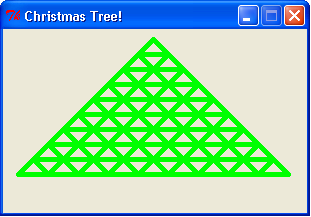
Include a getMouse() call at the end of your function so the graphics window is displayed long enough to be seen.
-
BONUS: (5 points) Decorate your pyramid with flags or poles. Hang
them using loop patterns, of course. You could even hang photos (zellegraphics accepts GIF format only) on the
poles.
-
Submit your code by committing the final version to your Subversion repository.