range.
Write a Python
range
expression for each of the following lists. You should write your expressions in a new file,
rangeAndList.py, in IDLE, using
print
statements to print the answers. Answers to the first two are given as examples.
-
[0, 1, 2, 3, 4, 5]
Answer:print "3a.", range(6) -
[2, 3, 4, 5, 6, 7]
Answer:print "3b.", range(2, 8) -
[-2, -1, 0, 1, 2] -
[1, 3, 5, 7, 9] -
[1, 4] -
[0, 2, 4, 6, 8, 10, 12, 14, 16, 18] -
[2, 1, 0, -1, -2]
Manipulating Lists. Continuing with the rangeAndList.py file you created for the previous problem, add the following line of code:
myList = [3, 6, 8, 11, 7, 4, 5, 9, 10, 0, 2]
Now add statements to your program that print each of the following numbers or lists using expressions involving
myList. Again, a couple of examples are given.
-
3
Answer:print "4a.", myList[0] -
[3, 6, 8]
Answer:print "4b.", myList[:3] -
[8, 11, 7, 4] -
2 -
[0, 2] -
The position of
4inmyList. -
The length of
myList.
Upload the file containing your answers to problems 3 and 4 to the RangeAndList dropbox in the Homework 4 folder on ANGEL.
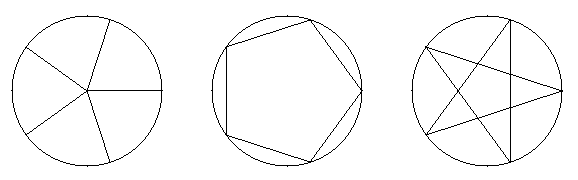
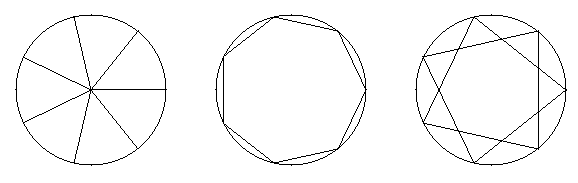
Some Geometry with Lists. For this problem you'll write three small, separate but similar, graphics programs: Pizza, Polygon, and Star.
Each program prompts the user to enter an odd integer, number. Then the programs draw pictures as follows:
- (15 pts) The Pizza program draws a "pizza pie" with number slices.
- [Has a 24 hour extension] (15 pts) The Polygon program draws a circle with an inscribed regular polygon with number sides.
- [Has a 24 hour extension] (15 pts) The Star program draws a circle with an inscribed star generated by connecting every other vertex of a regular polygon.
The pictures below show what the display of your programs should look like for a couple of cases.
Examples when number is 5:
Examples when number is 7:
Copy and paste liberally during this assignment, but get Pizza right before moving on to Polygon and Star.
You may wish to use the following code, which generates an appropriate list of Points for any value of number:
    # Some constants
    radius = 150
    centerX = 200
    centerY = 200

    # Builds vertices list
    vertices = []
    for i in range(number):
        x = radius * cos(2 * pi * i / number) + centerX
        y = radius * sin(2 * pi * i / number) + centerY
        vertices.append(Point(x, y))
Do you see how you can iterate over the Points stored in the list vertices in order to find endpoints for the lines?
When you have finished and tested your programs, submit each Python source file to the corresponding drop box in the Homework 4 folder on ANGEL.
- Install Eclipse by following these instructions. (Upperclassmen need to update to Eclipse 3.4; freshmen can skip this.)
- Install and configure PyDev for Eclipse by following these instructions. (Upperclassmen need to do all of this; freshmen can skip the beginning and start at step 3 of Install the PyDev plug-in for Eclipse.)
- Install and configure Subclipse for Eclipse by following these instructions. (Everyone needs to do this.)
-
To get your bonus points, during session 5 you will do the following:
- Launch Eclipse and show us your Hello World Python program running.
- In Eclipse, show us your modified "spam.py" file that you checked out using Subclipse. If you didn't get this working, instead choose Window > Open Perspective > Other..., and show us that "SVN Repository Exploring" appears in the list.