|
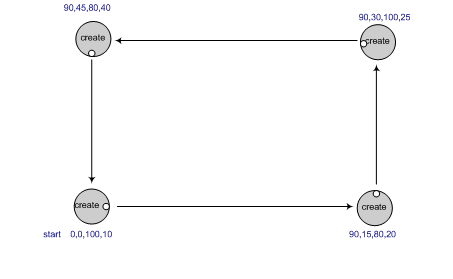
As an example, the picture to the right shows how the robot should move for box.txt.
Notes:
- To implement the turn and move functions specified in the module,
you should use the go
and stop functions as described
in the PyCreate documentation,
with a time.sleep for the right amount of time (which you'll have to calculate) in between.
- Another option to sleeping, that some may wish to try, is to
use feedback from the encoders to drive a certain distance.
(An encoder is a mechanical device attached the robot's
wheels to measure how far it has traveled). In this paradigm, your
program sends all the commands at once, and the robot does them in the
order it receives them. The advantage is that you don't need to
calculate how long to sleep, the waitAngle() and waitDistance() methods
do that for you. Caution: once you send the robot the
shutdown() command, it will stop immediately; the workaround is to
insert a long sleep before the shutdown command. See the pycreate
documentation for details.
- If you do decide to try the encoders, implement turnPerEncoders
and movePerEncoders functions in addition to the required
turn and move functions.
- Test your program by using the test-XXX files that we put into your Session08a-Files project.
Do additional testing as you see fit.
- In your testing, you will probably notice that the more the robot moves,
the less accurate it will become in moving the prescribed distance or returning to the same point.
This robot drifting is called odometry error.
Odometry error means that the longer the robot travels,
the sensor used to calculate the distance traveled (the encoder) begins to accumulate error.
This error is based upon wheel slippage, friction, uneven surfaces, wobbling wheels and/or sensor inaccuracy.
- In other words, the robot may “think” it is at a different place in the world than it actually is.
Odometry error is a well-known problem in robotics research and it is necessary to add hardware or
write control algorithms to combat this. For your homework, it is
important to recognize the problem but you will not modify your program
to compensate for it. (We'll investigate such compensatory methods later in the course.)
- Both partners should turn in identical copies of your completed program;
make sure that BOTH of you are listed as authors in a comment at the top of the file.
- Turn in your work by Team → Commit, as usual.
|
|