|
Write a program via.py, that will drive the robot through an environment
using moves to via points stored in a file. The program will:
- Prompt the user for the port to which they are connected.
- Prompt the user for the file name and open the file with that
name.
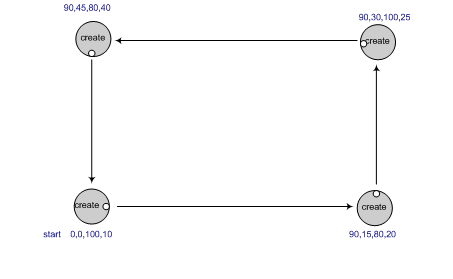
- Read each line of the file. Each line will contain 4 values (
turnAngleInDeg,
turnVelocity, fwdDistanceInCm, fwdVelocity
)
- For each line, turn the robot based upon the turn angle and
speed, then drive the robot forward based upon the
forward distance and velocity. For example, the picture to the right shows how the robot should move for box.txt.
Hints:
- Abstract the commands to turn and drive the robot into a function that you define, called (say) turnAndMove(...)
- You will likely use the go(), sleep(), and stop() functions to
move the robot, as you did last time. This is easiest, since it sends a
command, waits the right amount of time (which you'll have to
calculate), then sends the next command, etc.
- Don't forget to close both the file and the connection to the
robot (using robot.shutdown()) at the end of your code!
- Another option to sleeping, that some may wish to try, is to
use feedback from the encoders to drive a certain distance.
(An encoder is a mechanical device attached the robot's
wheels to measure how far it has traveled). In this paradigm, your
program sends all the commands at once, and the robot does them in the
order it receives them. The advantage is that you don't need to
calculate how long to sleep, the waitAngle() and waitDistance() methods
do that for you. Caution: once you send the robot the
shutdown() command, it will stop immediately; the workaround is to
insert a long sleep before the shutdown command. See the pycreate
documentation for details.
- What
you notice is that the more the robot moves the less accurate it will
become in moving the prescribed distance or returning to the same
point. This robot drifting is called odometry error. Odometery
error means that
the longer the robot travels, the sensor used to calculate the distance
traveled (the encoder) begins to accumulate error. This error is based
upon wheel slippage, friction, uneven surfaces, wobbling wheels or
sensor inaccuracy. In other words, the robot may “think” it is at a
different place in the world than it actually is. This is a common
problem in robotics research and it is necessary to add hardware or
write control algorithms to combat this. For your homework, it is
important to recognize the problem but you will not modify your program
to compensate for it.
|
|