(30 pts) File output and string formatting: Storing information in files is a very important exercise for engineers running experiments that generate a large quantity of useful data. The stored data can later be analyzed, categorized, and manipulated to allow engineers to draw useful conclusions.
Often, the generated data is formatted so that another
program can automate the process of analyzing, categorizing,
and manipulating the data. In this problem you are to write a program,
funcDump.py, that implements the following design:
- Prompt the user for a file name
- Open a file with the given name
-
Write 720 lines to the file. Each line should have the data:
n 200 + 200cos(nπ/180)
where n ranges from 0 to 719. Make sure the file is neatly formatted so numbers and decimal points line up. Below is a sample of the expected output. Your program's output should match this format exactly.
 98   172.165
 99   168.713
100   165.270
101   161.838
102   158.418
103   155.010
104   151.616
105   148.236
106   144.873
107   141.526
108   138.197
109   134.886
110   131.596
111   128.326
112   125.079
113   121.854
114   118.653
115   115.476
116   112.326
117   109.202
118   106.106
119   103.038
120   100.000
121    96.992
122    94.016
- Close the file
Submit your Python source file and the generated output to the funcDump Drop Box in the Homework 5 folder on ANGEL.
- Install Eclipse by following these instructions. (Upperclassmen need to update to Eclipse 3.4; freshmen can skip this.)
- Install and configure PyDev for Eclipse by following these instructions. (Upperclassmen need to do all of this; freshmen can skip the beginning and start at step 3 of Install the PyDev plug-in for Eclipse.)
- Install and configure Subclipse for Eclipse by following these instructions. (Everyone needs to do this.)
- You must show us in class next session (if you haven't
already):
- Launch Eclipse and show us your Hello World Python program running.
- In Eclipse, show us your modified "spam.py" file that you checked out using Subclipse. If you didn't get this working, instead choose Window > Open Perspective > Other..., and show us that "SVN Repository Exploring" appears in the list.
- Prompt the user for the port to which they are connected.
- Prompt the user for the file name and open the file with that name.
- Read each line of the file. Each line will contain 4 values (
turnAngleInDeg, turnVelocity, fwdDistanceInCm, fwdVelocity) - For each line, turn the robot based upon the turn angle and speed,
then drive the robot forward based upon the forward distance and velocity.
For example (this is box.txt):
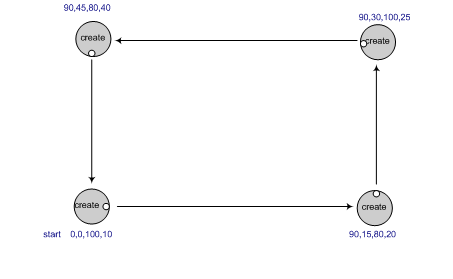
- You will likely use the go(), sleep(), and stop() functions to move the robot, as you did last time. This is easiest, since it sends a command, waits the right amount of time (which you'll have to calculate), then sends the next command, etc.
- Don't forget to close both the file and the connection to the robot (using robot.shutdown()) at the end of your code!