File output and string formatting: Write a program,
funcDump.py, that implements the following design:
- Prompt the user for a file name
- Open a file with the given name
-
Write 720 lines to the file. Each line should have the data:
n 200 + 200cos(nπ/180)
where n ranges from 0 to 719. Make sure the file is neatly formatted so numbers and decimal points line up. Below is a sample of the expected output. Your program's output should match this format exactly.
 98   172.165
 99   168.713
100   165.270
101   161.838
102   158.418
103   155.010
104   151.616
105   148.236
106   144.873
107   141.526
108   138.197
109   134.886
110   131.596
111   128.326
112   125.079
113   121.854
114   118.653
115   115.476
116   112.326
117   109.202
118   106.106
119   103.038
120   100.000
121    96.992
122    94.016
- Close the file
Submit your Python source file and the generated output to the funcDump Drop Box in the Homework 5 folder on ANGEL.
- Install Eclipse by following these instructions.
- Install and configure PyDev for Eclipse by following these instructions.
-
Write a program,
funcPlot.py, that implements the following design:- Prompt the user for a file name
- Open a file with the given name
- Display a graphics window with width 720 and height 400.
- Read each line from the file. For each line, plot a point on the graphics window. You should assume the lines have the format specified in problem 3. Treat the first number as the x coordinate and the second number as the y.
- Close the file
- Test your program using your output from problem 3. You may also test using the sample outputs for different functions below. (The functions are "upside down" because of the graphics coordinate system. Do you see how we could fix that?)
- Submit your Python source file to the funcPlot Drop Box in the Homework 6 folder on ANGEL. (This folder will be available by the middle of the week. We'll remind you to submit your funcPlot module on Homework 6.)
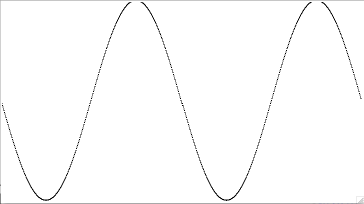
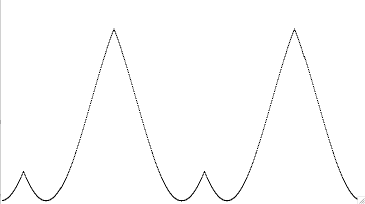
-
Create a version of
funcDump.pythat prompts the user to enter the function for column 2 instead of hardcoding the function. -
Create a version of
funcPlot.pythat rather than just plotting points, draws lines between consecutive points.