System Requirements
Specifications
Football Formation System
1. Introduction
1.1 Purpose
The purpose of this document is to identify and outline the requirements for implementing the Football Formation System to be used by the Rose-Hulman Football team. It will indicate the design we intend to implement in the development of this system through diagrams showing the relationships between data and processes, which can be used by anyone who wishes to do future work on the project, such as enhancements and maintenance.
1.2 Project Description
1.2.1 Description
The Football Formation System (FFS) will allow the user to track the formations used by an opponent on the playing field during the course of the game, to be presented to players at halftime and after a game. The user will interact with a graphics window embedded into a Windows 98/2000 application created in Visual C++ 6.0. The program will then store the formations as they are entered, and display recently-entered formations for easy selection, as it is likely that plays will be reused often. From this data, the system will create an easily displayable review of the plays from a game. This will allow the team to adapt and learn from previous experience.
1.2.2 Scope
Given that the software must be easy to use and run on the department’s laptop, only one solution presents itself. Software will be developed that runs on the team’s MS Windows-based laptop. The interface will allow the user to select from common formations and to create custom formations. The program will store these formations and will allow them to be exported in an easily presentable format for coach and player use. In the future this small, simple system could be transferred to small teams seeking similar abilities.
1.3 Context
Diagram

· Figure 1.2.2a Context Diagram for the Football Formation System
1.4 System Objectives
The primary objective of the Football Formation System is to allow quick and easy recording of plays that occur during the course of a football game. Once this is complete, the coach needs to have the ability to graphically show the players information pertaining to the formations entered. Thus, a presentation format is necessary. Also, plays entered during a game should be able to be saved for later use. Ease of use, reliability, and performance are the major enhancements to the existing paper-and-pencil system, and will thus be the key testing factors.
2. Data Model
2.1 Considerations
Throughout the course of a game in which the system is used, the system will collect information about play formations through graphical interaction with the user. Since the information is not needed until the game’s halftime, it can be stored in an internal data structure and virtually ignored until the formations need to be generated in presentation form. The system will maintain a list of frequencies for common plays and thus be able to show the most common formations, which will speed up selection. The user can select formations that closely match the current play and easily modify them to create new plays. Finally, the system will also maintain a file of all known formations (simply positions in a grid). The relationships between these data are shown below in the Entity Relationship Diagram.
2.2 Entity Relationship Diagram (ERD)
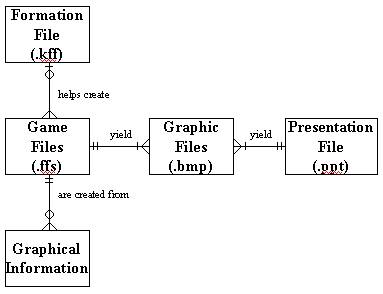
· Figure 2.2a Entity Relationship Diagram for the Football Formation System
2.3 Implementation
Implementing this system will be mostly GUI intensive, which is easily accomplished with OpenGL capabilities. This is because the system relies on speed and ease of use to allow for the rapid entering of plays, a perfect use for the real-time graphical interface OpenGL provides. The data structures involved should be simple, as data is entered in grid format. The FFS will also be able to save current sequences of plays to disk, and open them later, through Microsoft Foundation Classes serialization capability.
3. Process Model
3.1 Considerations
When the program starts, all known formations and frequencies of use will be read from a file. During a game, the system will read data from a grid on the screen as the user configures the players into formations. The data will then be stored in a data structure until it is either exported to a file or processed and placed into a media presentation. The bulk of processing takes place in the conversion to the various file formats.
3.2 Data Flow
Diagram (DFD)
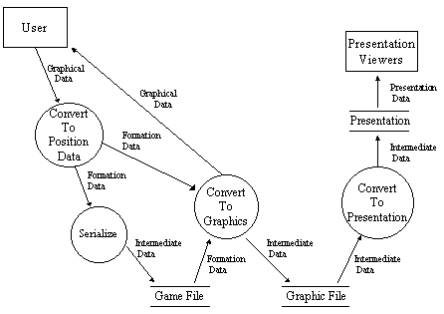
· Figure 3.2a Data Flow Diagram for Football Formation System
3.3 Implementation
The processing of data for the Football Formation System is limited to the translation of graphical data into different file formats, and, for opening old games, the translation of data stored in a file into graphical information. The interface for the system is nearly completed, so the remaining tasks involve selecting file formats and writing the code to implement it. For simplicity, text files containing MFC-serialized data may be used to store plays from a game and all known formations. To create presentations, OpenGL’s graphics output capabilities may be used to create a series of images easily imported into a PowerPoint presentation. Small modifications may be made as the need arises.
4. Revised Plans
4.1 Remaining Phases
The phases still remaining in the completion of this project are implementation, testing, and documentation.
4.2 Schedule
This is a rough estimate that may be subject to change as the problem is analyzed further. Refer to Figure 4.2a for a more detailed breakdown of the revised estimated completion schedule.
|
Phase |
Estimated Time for Completion |
|
Proposal/Feasibility Study |
Complete |
|
Analysis |
Complete |
|
Design |
Complete |
|
Prototype and implementation |
1-2 months |
|
Debugging, testing, and completion |
3-4 weeks |
·
Figure 4.2a Estimated Times for Phase
Completions
5. Conclusion
5.1 Summary
The Football Formation System is projected to be a simple system, but there are still many issues to consider and much functionality to implement. The system will have to deal with at least three different file formats (all known formations and frequencies of use, formations entered during a game, and a presentation format). However, OpenGL and MFC should provide the necessary capabilities to maintain system simplicity and ease of use.
5.2 Conclusion and Recommendation
For
a single group, and the given time constraints, a software solution meeting
this design seems easily attainable.
The interface has already been fairly well developed, and the next
phase, implementation of the core
system, has already begun. OpenGL and
MFC are the proposed APIs for the Football Formation System. Graphical output is recommended for creating
PowerPoint presentations, and simple MFC serialization is recommended for data
files.
5.3 Contacts
The following are contacts for the members of CS414 Team 8:
· Peter Bryson Peter.Bryson@rose-hulman.edu 877-8718
· Bill McKenna William.McKenna@rose-hulman.edu 877-8837
· Bill Richardson William.Richardson@rose-hulman.edu 877-8866
They are available for contact concerning the contents of this report and issues surrounding the project.
Below is the Rose-Hulman Athletics contact:
·
Sean Bendel Sean.Bendel@rose-hulman.edu 877-8967