Requirements
-External Interfaces
-Functional Requirements
-Performance Requirements
-Logical Database Requirements
-Design Constraints
-Software System Attributes
-Other Requirements
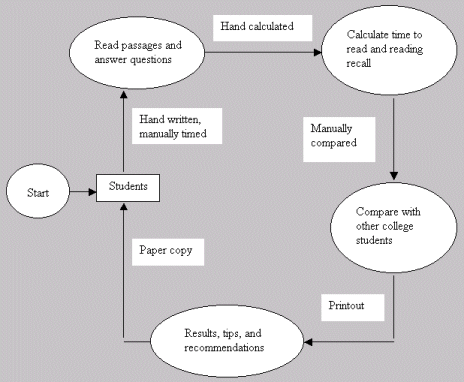
Dr. James Gregory and Dr. William Carter want to make the Reading Recall Time Efficiency Assessment Tool that they have developed available on the Internet. The mission of the tool is to allow people to self-assess their efficiency for learning through reading relative to other college students. Dr. Gregory and Dr. Carter's main goal is to make it easier for students to use the reading assessment tool. Their current system requires students to come to the Testing Center where the assessment is administered manually.
This team's objective is to design a web-based version of the reading assessment tool. The objectives for the assessment tool are to provide users a method to test for possible interference factors that reduce academic performance in college and to provide history or facts about Texas Tech University and other topics associated with the College of Engineering. The assessment will consist of two passages, with the flexibility for adding a third. The tool will time the user as he or she reads each passage and then ask the user a series of questions about each passage. The tool will calculate the time to read and reading recall for each passage and compare the results with those of other college students. The tool will then display the results for the student, using integrated information to make general recommendations and to provide tips to improve success in college. The passages, questions, and integrated information will all be stored in a database.
Types Of Users:
College Students
Junior College Students
High School Students
Professionals
Someone who suspects that they have a reading disability
Someone who had a low preference for reading in the Learning Style assessment
Someone whose first language is not English
Skills:
Basic reading ability
Basic computer skills
Ability to use a mouse and keyboard
Ability to use hyperlinks to navigate the Internet
1. User Log on Interface and user Home page Interface will have the same interface: The System shall have a user Log on Interface and user Homepage Interface.
|
Rank
|
Status
|
Risk
|
|
1-Critical
|
2-In
Development |
2-Moderate
|
1.1 User Homepage Interface
1.1.1 Homepage: The system shall have a main screen. The main screen should include the title- Reading Assessment, Guest Entry, Mission, Instruction, Information, Menu, Reading Assessment, Results and Recommendations, Tips on Reading, Evaluation of This Tool (Please Help).
1.1.1.1 Title: The homepage title and heading shall be: "Reading Assessment."
1.1.1.2 Guest Entry: The system shall have a guest entry on the main screen.
1.1.1.3 Mission: The system shall have a mission statement provided on the homepage. The mission shall be “the mission of this tool is to provide assessment of reading and feedback on appropriate action to improve academic success.”
1.1.1.4 Instruction: The system shall have a link labeled "Instructions" on the homepage.
1.1.1.5 Information: The system shall have a link labeled "Information" on the homepage.
1.1.1.6 Menu: The system shall have an interactive menu that includes: Reading Assessment Results and Recommendations, Tips on Reading, Evaluation of This Tool (Please Help).
1.1.1.7 Reading Assessment: The system shall have a link to the reading assessment that is included under the menu on the homepage called "Reading Assessment."
1.1.1.8 Results and Recommendations: The system shall have a link to results and recommendations that are included under the menu on the homepage.
1.1.1.9 Tips on Reading: The system shall have tips on reading that are included under the menu on the homepage.
1.1.1.10 Evaluation of This Tool (Please Help): The system shall have evaluation of this tool (Please Help) that is included under the menu on the homepage.
1.1.1.10.1 The Evaluation shall contain a way for the user to comment on the system (for the software team's benefit).
1.2 The system shall have a Guest Entry interface.
| Rank | Status | Risk |
| 1 - Critical | 3 - Not being worked on | 2 - Moderate |
1.2.1 The system shall ask the age of the guest, and provide a dropdown button to get the age ranging from 10 to 70.
1.2.2 The system shall ask whether English is the first and primary language of the guest, and provide two radio buttons for the answers of "Yes" and "No".
1.2.3 If the first and primary language of the guest is not English, the system shall ask the following questions.
1.2.3.1 The system shall ask that how long the guest has studied English, and provide a dropdown button to get the answer ranging from 1 to 20 years.
1.2.3.2 The system shall ask how long the guest has lived in a country where English is the primary language, and provide a dropdown button to get the answer from 1 to 60 months.
1.2.4 The system shall have a "SUBMIT" button.
| Rank |
Status |
Risk |
|
2 |
2 |
3 |
1.3 Reading
Tips Interface
1.3.1 The tips document will be displayed on a white background.
1.3.1.1 The passage title shall be black, 16pt Times New Roman Font, bolded and shall be centered 2 lines above the passage.
1.3.1.2 The passage shall be black, 10pt Times New Roman Font, left and right justified, and paragraphed and spaced as in source file.
1.3.2 Centered below the passage shall be a windows push button.
1.3.2.1 The button will be gray filled.
1.3.2.2 “OK” shall appear centered in the button in 16pt black text.
2.1 Guest Entry survey
|
Rank |
Status |
Risk |
|
1 - Critical |
3 - Not being worked on |
2 - Moderate |
2.1.1 When the user selects the "Guest Entry" option on the home page, a new page shall appear with a survey.
2.1.2 The first question shall be: "We need an estimate of your age.".
2.1.2.1 The system shall provide a dropdown menu to select the age.
2.1.2.2 The ages provided in the dropdown menu shall be as follows:
10, 15, 20, 30, 40, 50, 60, 70, 70+.
2.1.2.3 The user shall be able to choose only one of the answers from the dropdown menu.
2.1.3 The second question shall be "Is English your first and primary language?".
2.1.3.1 The system shall provide two radio buttons, “Yes” and “No”.
2.1.3.2 The user shall be able to choose only one of the answers, ("Yes" or "No").
2.1.3.3 If the user’s answer is "Yes" to 2.1.3.1, the system shall tell the user “The survey is complete. Click "SUBMIT" to continue.”
2.1.3.4 The home page shall appear after the user clicks “SUBMIT”.
2.1.3.5 If the user’s answer is "No", the system shall continue the survey questions.
2.1.4 The third question shall be "How long have you studied English?".
2.1.4.1 The system shall provide a dropdown menu to select the number of years.
2.1.4.2 The years provided in the dropdown list shall be as follows:
1, 2, 3, 4, 5, 10, 15, 20, 20+ .
2.1.4.3 The user shall be able to choose only one answer from the dropdown menu.
2.1.5 The forth question shall be "How long have you lived in a country where English is the primary language?"
2.1.5.1 The system shall provide a dropdown menu to select the number of months.
2.1.5.2 The number of months provided in the dropdown menu shall be as follows:
1, 3, 6, 9, 12, 18, 24, 36, 48, 60, 60+.
2.1.5.3 The user shall be able to choose only one answer from the dropdown menu.
2.1.6 The system shall display a "SUBMIT" button after all the questions on the survey have been answered
2.1.6.1 When the user has finished answering all the questions, and has clicked "SUBMIT", the system shall save the answers and return to the home page.
2.2 When the guest chooses Instruction option on the homepage of Reading Assessment, the system shall provide a link to a new page which shall introduce how to do reading assessment.
| Rank | Status | Risk |
| 2 - Needed | 2 - In Development | 3 - Straightforward |
2.2.1 The client shall assist in creating the Instruction web page.
2.2.2 The system shall set up the link to the Instruction page.
2.2.3 The Instruction page shall be opened in a different window from the Reading Assessment window. The user shall decide the closing of this window . The user can keep choosing all the other options on the Reading Assessment homepage without closing the Instruction page.
2.3 Timer
|
Rank |
Status |
Risk |
|
1 - Critical |
2 - In Development |
3 - Little Difficulty |
2.3.1 Feature purpose: After the user selects the reading assessment option, a timer will time how long it takes for the user to read each predetermined passage.
2.3.2 After the user selects the reading assessment option:
2.3.2.1 The instructions specified by the client for taking the test shall appear on a new screen.
2.3.2.2 A start button shall be centered below the instructions.
2.3.3 After the user selects the start button:
2.3.3.1 A new screen shall appear with the first passage.
2.3.3.2 A timer shall begin when the passage appears.
2.3.3.3 A stop button shall be centered below the passage.
2.3.4 After the user selects the stop button:
2.3.4.1 The passage shall be cleared from the screen.
2.3.4.2 The timer shall stop.
2.3.4.3 The user will not be able to return to the passage before the assessment is complete. The browser back button will be inactive.
2.3.4.4 The time lapse in seconds from the start of the timer until the stop of the timer shall be calculated and stored as a variable.
2.4 System feature 4
“Questions”: There shall be a series of questions for each tester to answer
after completing each timed reading section.
| Rank | Status | Risk |
| 1 - Critical | 2 - In Development | 3 - Straightforward |
2.4.1 Introduction/purpose of feature: These questions are designed to test each user’s comprehension and retention of information viewed in each reading selection. The questions will be based directly on the material, and shall begin immediately after the tester has read the related selection.
2.4.3 Associated Functional Requirements:
2.4.3.1 There shall be two question answering sessions. One beginning after the first reading selection is viewed and completed. The other beginning after the second reading selection is view and completed.
2.4.3.2 Only one question shall be visible to the tester at a time.
2.4.3.3 The tester shall not be able to view previously answered questions, or questions to be prompted in the future. (i.e. the browser will not allow for navigation backwards or forwards through the questions)
2.4.3.4 After answering/completing a question the user shall be prompted to continue on.
2.4.3.4.1 When the tester has
completed a question (selected an answer), a button will appear, prompting the
user to continue. This button will either not be visible or not be accessible to
the tester before the tester answers the current question.
2.4.3.4.2 When the tester has completed all the questions covering the first reading selection, the user will be prompted to continue to the second reading selection.
2.4.3.4.3 When the tester has completed all the questions covering the second reading selection, the tester will be prompted to continue to the “results page”.
2.4.3.5 There will be 10 questions for each reading selection
2.4.3.6 Each question will be a multiple choice and consist of a question and 4 possible answers labeled A, B, C, D, respectively.
2.4.3.7 All questions will be
stored in the database.
2.4.3.8 The correct answers to
the questions asked will be stored in the database.
2.4.3.9 The tester’s answers to each question shall be compared to the correct answer, and assessed as correct or incorrect.
2.4.3.10 The number of questions the user answers correctly per each reading selection shall be stored in the database, and associated with the current tester.
2.5
Compilation: The data collected from each tester’s assessment shall be
compiled into useful statistics reflecting the tester’s comprehension of the
material.
| Rank | Status | Risk |
| 1 - Critical | 2 - In Development | 2 - Moderate |
2.5.1 Feature Purpose: The compilation of the tester’s data collected from the test phases (timed reading assessment and comprehensive questions) shall determine how each tester compares with the mean of previously recorded test results provided by the client. A code will be generated for each tester with respect to their test results. Each code shall be a number from 1 to 3 representing the number of standard deviations from the mean of the test results, where a code 3 represents that a tester’s score was 3 or more standard deviations from the mean score, a code 2 represents that a tester's score was between 2 and 3 standard deviations from the mean score, and a code 1 represents that a tester's score was less than 2 standard deviations from the mean.
2.5.2
Associated Functional Requirements:
2.5.2.1 The tester’s data shall be recorded as variables and shall not be stored in the database.
2.5.2.1.1 The tester’s data shall be recorded in sections, where each section shall correspond to one of the reading selections (Passage A, Passage B, etc.)
2.5.2.1.2 The tester’s time taken for each reading selection shall be recorded as a separate variable.
2.5.2.1.3 The number of questions the tester answered correctly for each set of questions shall be recorded as a separate variable.
2.5.2.2 Each tester’s results shall be compared with the mean of the previously recorded data.
2.5.2.2.1 The tester’s time for each reading assessment shall be compared to the mean and standard deviation of time for each reading selection. A statistical “z score” shall be calculated for the tester’s reading time.
2.5.2.2.2 A statistical “z score” shall be calculated for the tester’s number of correct answers.
2.5.2.3 A code will be assigned to the tester based on the tester's z score.2.5.2.3.1 If the tester's z score for a timed reading assessment is greater than 3 then a code of 1 will be assigned to the tester for that reading selection.
2.5.2.3.2 If the tester's z score for a timed reading assessments is between 2 and 3, then a 2 will be assigned to the tester for that reading selection.
2.5.2.3.3 All other z scores for a reading selection will result in the assignment of a code of 3 to the tester for that reading selection
2.5.2.3.4 If the tester's z score for a question section is less than -3, then a code of 1 will be assigned to the tester, for that question section.
2.5.2.3.5 If the tester's z score for a question section is less than -2 but greater than -3, then a code of 2 will be assigned to the tester for that question section.
2.5.2.3.6 All other z scores for the tester will result in the assignment of code 3 to the tester for that question section.
2.6 The system shall provide a “Results and Recommendation” page, after the user finishes the reading assessment tests.
|
Rank |
Status |
Risk |
|
1 – Critical |
3 - Not being worked on |
2 – Moderate |
2.6.1 Introduction/Purpose of Feature: The “Results and Recommendation” page shall display the tester’s results, (reading time and number of questions answered correctly) and a message representing the tester’s reading assessment code. This purpose of this page is to give the tester, and possibly administrators, feedback on the tester’s performance, and to determine the probability of the tester having a reading problem/disability.
2.6.2 After the tester completes all of the reading assessment tests, this page shall appear.
2.6.3 The “Results and Recommendation” page shall display the “Time Score” of the user.
2.6.3.1 The “Time Score” is the user's reading time.
2.6.4 The “Results and Recommendation” page shall display the "Recall Score %" of the user.
2.6.4.1 The “Recall Score %”= ((Number of questions answered correctly) / (Number of questions)) * 100
2.6.5 The system should display non-offensive messages of recommendation to the tester according the testers calculated reading assessment code.
2.6.5.1 The system shall display two kinds of recommendations according to the testers reading assessment code: one for a reading assessment code of 2, and one for a reading assessment code of 1. (see compilation for determining codes)
2.6.5.1.1 A reading assessment code of 1 indicates that the tester has a high probability of having a reading problem. The recommendation for this code shall suggest the tester seek professional assistance.
2.6.5.1.2 A reading assessment code of 2 indicates that the tester has a moderate probability of having a reading problem. The recommendation for this code shall suggest the tester seek professional assistance, reevaluate their reading skill, or look into ways of possibly improving their skill.
2.6.5.1.3 A reading assessment code of 3 indicates that the tester falls among the norm of testers taking the reading assessment. It does not require a recommendation, but shall indicate that the tester probably does not have a reading problem.
2.6.6 The system shall have a PRINT button to ask user if he/she need to print out the results and recommendation page. If the "PRINT" option is chosen, the “Results and Recommendation” page shall be printed by a local printer.
2.6.7. After the user finishes all tests, and before the user closes the window, the user shall be able to access the results and recommendations anytime by clicking the “Results and Recommendation” button on the reading assessment homepage.
2.7 Reading tips
|
Rank |
Status |
Risk |
|
2 |
2 |
3 |
2.7.1 Feature purpose: When the user selects the “Tips on Reading” option from the home page, a new page appears with a tips document.
2.7.2 After the user selects the “Tips on Reading” option from the home page:
2.7.2.1 A new page shall appear with a client formatted and specified document.
2.7.2.2 A return button shall be centered below the tips document.
2.7.3 After the user selects the return button:
2.7.3.1 The home page shall be displayed.
3.1 The system shall have an estimated maximum number of 50 simultaneous users, but the limit will be ultimately dependent upon the capabilities of the server used to host the system.
3.2 A normal workload will be estimated to be 1 or 2 simultaneous users.
3.3 The database shall be accessed a number of M∙N times, where M can be considered the number of passages for the tester to read and N the number of associated questions.
3.3.1 Under normal conditions there shall be an estimate of 2 passages read and 10 associated questions for each passage.
3.4 The maximum access time for each passage and question should not exceed 10 seconds, but this is dependent upon the user’s internet connection.
3.5 All data handled by the system shall be in the form of integers, real numbers, characters, strings, and text. Retrieving these elements from the database and processing them to achieve an output should not delay the user when taking the reading assessment.
4.1 The system shall access a database containing data relating to each reading assessment.
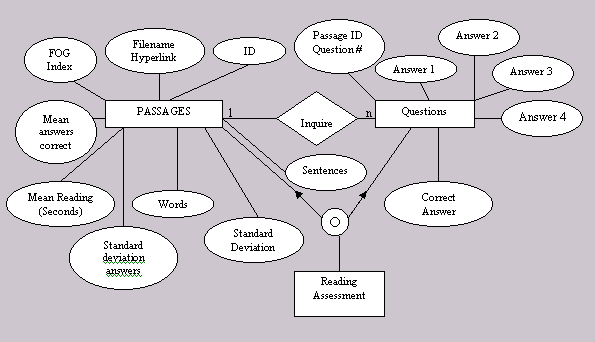
4.2 The database shall consist of two tables. One table shall be used to store data with reference to the reading passages. The other table shall be used to store data with reference to the questions and answers.
4.3 The two tables shall exhibit a 1 to N relationship, where for every one passage there shall be N associated questions.
4.4 The “passages” table shall consist of the following data:
4.4.1.1 The Passage ID shall be stored as an integer.
4.4.1.2 The Filename shall be stored as a local file system path, or web address.
4.4.1.3 The Passage Name shall be stored as a string.
4.4.1.4 The FOG Index shall be stored as a real number.
4.4.1.5 The Mean Reading Time of Testers’ shall be stored as a real number.
4.4.1.6 The Mean Number of Correct Answers the testers answered shall be stored as a real number.
4.4.1.7 The Standard Deviation of reading time shall be stored as a real number.
4.4.1.8 The Standard Deviation of the number of questions the testers’ answered correctly shall be stored as a real number.
4.4.1.9 The Number of Words in the passage shall be stored as an integer.
4.4.1.10 The Number of Sentences in the passage shall be stored as an integer.
4.4.2 The filename (web address/local file system path) is used as a reference to the actual text of the passage. Since databases have a set limit of characters for` storing each data element, it is probably a better practice to simply provide an address to where the text is saved.
4.4.3 The Passage ID shall serve as the primary key for the “passages” table.
4.5 The “questions” table shall consist of the following data:
4.5.1.1 The Passage ID shall be stored as an integer.
4.5.1.2 The Question Number shall be stored as an integer.
4.5.1.3 The Question shall be stored as text.
4.5.1.4 The Four Answers shall be stored as text.
4.5.1.5 The Correct Answer shall be stored as text.
4.5.2 The Passage ID and Question Number Data elements shall serve as a primary key for this table.
4.5.2.1 The Passage ID in the “Questions” table shall be used as a foreign key into the “passages” table.
4.6 The database shall not be updated with new data, but shall only be accessed for statistical analysis and reference. In other words, each tester’s data shall not affect the mean and standard deviation of the passage. An administrator shall be the only one able to change/update these fields.
5.1 The system screens shall have a look and feel consistent with the rest of the Ed Doctor system.
5.2 The system screens for the actual reading assessment shall not have graphics or themes that could interfere with the timing mechanism used to measure the time taken to read the passages.
6.1 Reliability6.2 Availability
6.2.1 The system shall be available whenever the server is available.
6.2.2 In the event that the server goes down, the system shall recover to the state it was in prior to the server failure.
6.3 Security
6.3.1 The system database shall only be available to system administrators.
6.4 Maintainability6.4.1 The system shall be implemented so that additional passages can be added with ease in the future.
6.5 Portability6.5.1 The system shall be available on the Internet and shall be compatible with Windows Internet Explorer.
NA- No other Requirements at this time
<This section shows the use case diagram with the system delineated by a bounded box, with all of the actors, and with all of the use cases.>
|
User Action |
System Reaction |
|
User enters site |
Home Page Screen appears |
|
Click on “Instructions” button |
Instruction Document
Page appears |
|
Click on
“Return” button |
Home Page Screen appears |
|
Click on “Reading
Tips” button |
Reading Tips Page
appears |
|
Click on “Return”
button |
Home Page Screen appears |
|
User Action |
System Reaction |
|
Click on Reading Assessment link |
Instruction Document
Page appears |
|
Click on “Start”
button |
Timer starts, assessment
passage is displayed followed by stop button. |
|
Click on “Stop”
button |
Timer stops, assessment
passage is cleared from page, questions are displayed. |
|
User clicks on radio
button under each question to select answers. |
The radio button next to
the users choice is selected while the others remain unselected. |
|
User clicks on a radio button for a different
answer than chosen the first time. |
The radio button of the new choice is selected and
all other choices to that question are unselected. |
|
User clicks “Finished” button |
The questions are cleared from page and results page is displayed. |

NA- No client materials posted at this time
NA- No reference materials posted at this time
| Items |
| Client Materials Section |
NA- There are no Team Request Forms at this time.
| Date | Name | Revision |
| 11/07/2001 | Lindsey Cook |
|
| 11/08/2001 | Lindsey Cook |
|
| 11/19/2001 | Lindsey Cook |
|
| 11/27/2001 | Lindsey Cook |
|
| 11/28/2001 | Lindsey Cook |
|